---
title: Creating an interview template in OnScreen
description: OnScreen - Creating interview templates
---
[Skip to content](https://help.hackerearth.com/creating-an-interview-template-in-onscreen#main-content)

Open main navigation
Close main navigation
Hello. How can we help you?
- There are no suggestions because the search field is empty.
1. [Help Center](https://help.hackerearth.com/?hsLang=en)
2. [OnScreen](https://help.hackerearth.com/onscreen?hsLang=en)
3. [OnScreen - Interview templates](https://help.hackerearth.com/onscreen?hsLang=en#onscreen-interview-templates)
# Creating an interview template in OnScreen
Templates define the questions, skills, and proctoring for an OnScreen interview. After you create a template, you can invite candidates to an interview that is based on it.
You can create a template in two ways:
- **AI builder**: Describe the role or upload a job description, and the AI builder proposes the skills, interview phases, and proctoring settings for you.
- **Manual creation**: Enter the job title, job requirements, and duration yourself, and select the skills you want covered.
You can also clone one of the sample templates that are curated by HackerEarth and adjust it to fit your role.
#### Opening the OnScreen templates page
1. Log in to your HackerEarth Recruit account by using your admin credentials.
2. In the left panel, click **OnScreen**.
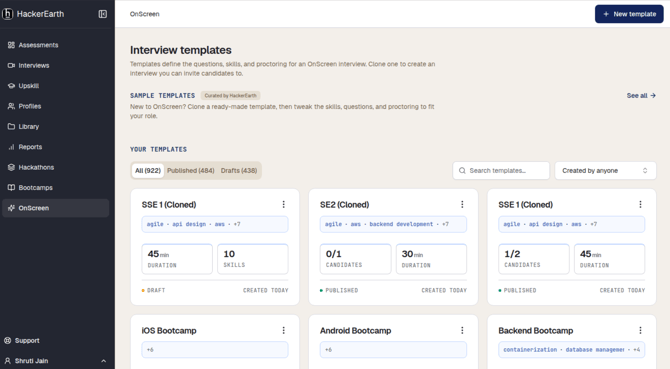
The **Interview templates** page is displayed. Your templates are listed under **Your templates**, where you can do the following:
- Filter by **All**, **Published**, or **Drafts**
- Search for a template by name
- Filter by who created the template, by using the **Created by anyone** list
Each template card shows the skills that are covered, the duration, the number of skills or candidates, and whether the template is a **Draft** or is **Published**.
To start from a ready-made template instead, go to the **Sample templates** section, click **See all**, and clone the template that fits your role.
#### Creating a template by using the AI builder
To create a template with the AI builder, follow these steps:
1. On the **Interview templates** page, click **New template**.
2. Describe the role in the text box — for example, the job title, the interview duration, and the areas you want covered. You can also click one of the suggested roles, such as **Senior Software Engineer**, to start from there.
To use a job description instead, click **Add JD** and upload the file.
*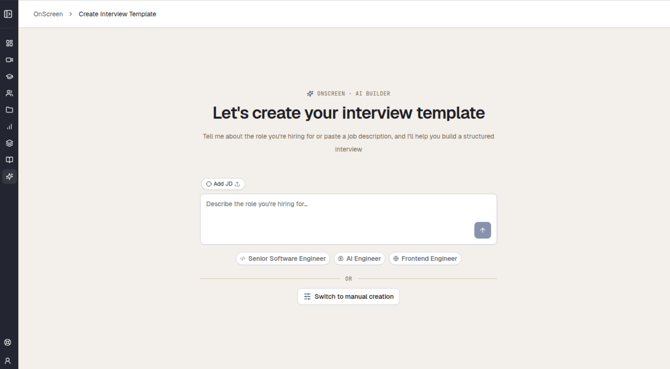*
3. Click the send icon.
4. Review what the AI builder has parsed from your input, such as the role, the suggested skills, the experience level, and the work arrangement. Reply in the chat to refine the template — for example, to name the specific skills you want covered.
5. Review the draft template in the right pane. It contains the following:
- **Template name** and **Duration**
- **Proctoring settings**, which show which proctoring features are turned on or off for the interview
- **Interview phases**, such as **Introduction**, **Background & Resume**, and **Technical discussion**, with the topics under each phase
6. Click **Create template**.
*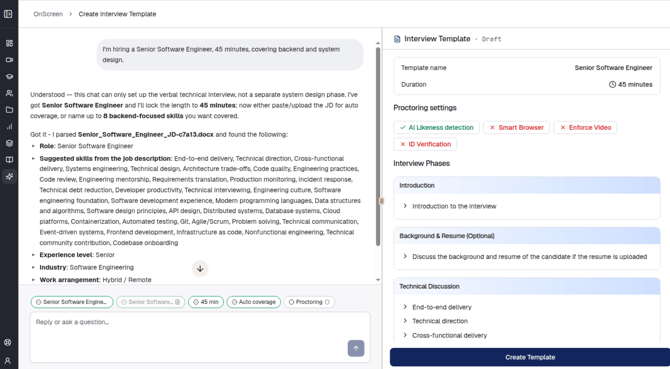*
**Note**: The chips above the chat box show what has been set so far, such as the role, the duration, the skill coverage, and the proctoring settings. Use them to check what the AI builder has captured before you create the template.
#### Creating a template manually
To create a template without the AI builder, follow these steps:
1. On the **Interview templates** page, click **New template**.
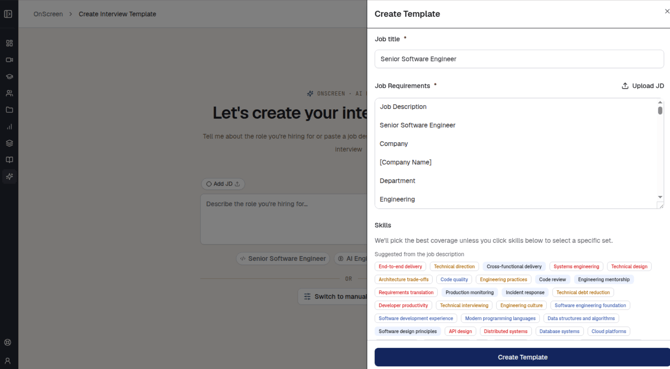
2. Click **Switch to manual creation**. The **Create template** pane opens.
*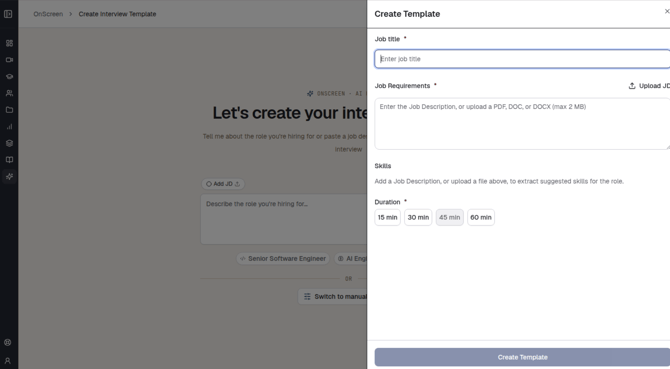*
3. In the **Job title** field, enter the title of the role. This field is mandatory.
4. In the **Job requirements** field, enter the job description. Alternatively, click **Upload JD** to upload a PDF, DOC, or DOCX file of up to 2 MB. This field is mandatory.
5. Under **Skills**, select the skills that you want the interview to cover. The skills are suggested from the job description that you entered or uploaded, so this list appears only after you add one. If you do not select any skills, the best coverage for the role is picked for you.
6. Under **Duration**, select the length of the interview: **15 min**, **30 min**, **45 min**, or **60 min**. This field is mandatory.
7. Click **Create template**.
**
#### Reviewing the template and inviting candidates
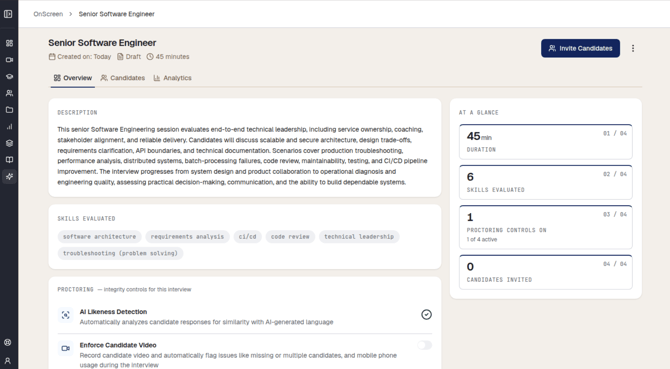
After the template is created, it opens on the **Overview** tab. The header shows the template name, the date it was created, its status (**Draft** or **Published**), and the interview duration.
The Overview tab contains the following:
- **Description**: A summary of what the interview session evaluates and how it progresses.
- **Skills evaluated**: The skills that the interview covers.
- **Proctoring**: The integrity controls for this interview. Use the toggle beside each control to turn it on or off — for example, **AI Likeness Detection**, which analyzes candidate responses for similarity with AI-generated language, and **Enforce Candidate Video**, which records candidate video and flags issues such as a missing candidate, multiple candidates, or mobile phone usage during the interview.
- **At a glance**: A summary of the duration, the number of skills evaluated, how many proctoring controls are active, and the number of candidates invited so far.
Two more tabs are available for the template:
- **Candidates**: The candidates who have been invited to interviews that are based on this template.
- **Analytics**: Interview analytics for this template.
To invite candidates, click **Invite Candidates** in the top-right corner. For more options, click the three dots beside it.
- [Assessments: Recruiters](https://help.hackerearth.com/assessments-recruiters?hsLang=en#main-content)
- [Getting started](https://help.hackerearth.com/assessments-recruiters?hsLang=en#getting-started)
- [Account settings](https://help.hackerearth.com/assessments-recruiters?hsLang=en#account-settings)
- [Admin management](https://help.hackerearth.com/assessments-recruiters?hsLang=en#admin-management)
- [Creating tests automatically](https://help.hackerearth.com/assessments-recruiters?hsLang=en#creating-tests-automatically)
- [Creating tests manually](https://help.hackerearth.com/assessments-recruiters?hsLang=en#creating-tests-manually)
- [Test settings](https://help.hackerearth.com/assessments-recruiters?hsLang=en#test-settings)
- [Sections and question pooling](https://help.hackerearth.com/assessments-recruiters?hsLang=en#sections-and-question-pooling)
- [Libraries](https://help.hackerearth.com/assessments-recruiters?hsLang=en#libraries)
- [Multiple Choice Questions (MCQs)](https://help.hackerearth.com/assessments-recruiters?hsLang=en#multiple-choice-questions-mcqs)
- [Programming](https://help.hackerearth.com/assessments-recruiters?hsLang=en#programming)
- [Project](https://help.hackerearth.com/assessments-recruiters?hsLang=en#project)
- [SQL](https://help.hackerearth.com/assessments-recruiters?hsLang=en#sql)
- [Data science](https://help.hackerearth.com/assessments-recruiters?hsLang=en#data-science)
- [Machine Learning (ML)](https://help.hackerearth.com/assessments-recruiters?hsLang=en#machine-learning-ml)
- [DevOps](https://help.hackerearth.com/assessments-recruiters?hsLang=en#devops)
- [Python project questions](https://help.hackerearth.com/assessments-recruiters?hsLang=en#python-project-questions)
- [Automation Testing](https://help.hackerearth.com/assessments-recruiters?hsLang=en#automation-testing)
- [Java Project](https://help.hackerearth.com/assessments-recruiters?hsLang=en#java-project)
- [C# project questions](https://help.hackerearth.com/assessments-recruiters?hsLang=en#c-project-questions)
- [Subjective](https://help.hackerearth.com/assessments-recruiters?hsLang=en#subjective)
- [Approximate](https://help.hackerearth.com/assessments-recruiters?hsLang=en#approximate)
- [Diagram](https://help.hackerearth.com/assessments-recruiters?hsLang=en#diagram)
- [File upload](https://help.hackerearth.com/assessments-recruiters?hsLang=en#file-upload)
- [Invites](https://help.hackerearth.com/assessments-recruiters?hsLang=en#invites)
- [Reports](https://help.hackerearth.com/assessments-recruiters?hsLang=en#reports)
- [Billing](https://help.hackerearth.com/assessments-recruiters?hsLang=en#billing)
- [HackerEarth Reports: Admins, Tests, and Teams](https://help.hackerearth.com/assessments-recruiters?hsLang=en#hackerearth-reports-admins-tests-and-teams)
- [Technical Content Updates](https://help.hackerearth.com/assessments-recruiters?hsLang=en#technical-content-updates)
- [FaceCode](https://help.hackerearth.com/facecode?hsLang=en#main-content)
- [FaceCode and its features](https://help.hackerearth.com/facecode?hsLang=en#facecode-and-its-features)
- [Scheduling interviews on FaceCode](https://help.hackerearth.com/facecode?hsLang=en#scheduling-interviews-on-facecode)
- [Assessments: ATS integrations](https://help.hackerearth.com/assessments-ats-integrations?hsLang=en#main-content)
- [Integration](https://help.hackerearth.com/assessments-ats-integrations?hsLang=en#integration)
- [iCIMS](https://help.hackerearth.com/assessments-ats-integrations?hsLang=en#icims)
- [Zoho Recruit](https://help.hackerearth.com/assessments-ats-integrations?hsLang=en#zoho-recruit)
- [SmartRecruiters](https://help.hackerearth.com/assessments-ats-integrations?hsLang=en#smartrecruiters)
- [EightFold](https://help.hackerearth.com/assessments-ats-integrations?hsLang=en#eightfold)
- [SuccessFactors](https://help.hackerearth.com/assessments-ats-integrations?hsLang=en#successfactors)
- [Greenhouse](https://help.hackerearth.com/assessments-ats-integrations?hsLang=en#greenhouse)
- [Lever](https://help.hackerearth.com/assessments-ats-integrations?hsLang=en#lever)
- [Linkedin Talent Hub](https://help.hackerearth.com/assessments-ats-integrations?hsLang=en#linkedin-talent-hub)
- [JazzHR](https://help.hackerearth.com/assessments-ats-integrations?hsLang=en#jazzhr)
- [Workable](https://help.hackerearth.com/assessments-ats-integrations?hsLang=en#workable)
- [Recruiterbox - Trakstar Hire](https://help.hackerearth.com/assessments-ats-integrations?hsLang=en#recruiterbox-trakstar-hire)
- [Jobvite](https://help.hackerearth.com/assessments-ats-integrations?hsLang=en#jobvite)
- [Ashby](https://help.hackerearth.com/assessments-ats-integrations?hsLang=en#ashby)
- [Assessments: Product updates](https://help.hackerearth.com/assessments-product-updates?hsLang=en#main-content)
- [Release notes: HackerEarth Assessment](https://help.hackerearth.com/assessments-product-updates?hsLang=en#release-notes-hackerearth-assessment)
- [Root Cause Analysis (RCA)](https://help.hackerearth.com/assessments-product-updates?hsLang=en#root-cause-analysis-rca)
- [Content updates](https://help.hackerearth.com/assessments-product-updates?hsLang=en#content-updates)
- [Assessments: Best practices](https://help.hackerearth.com/assessments-best-practices?hsLang=en#main-content)
- [Recruit](https://help.hackerearth.com/assessments-best-practices?hsLang=en#recruit)
- [SSO](https://help.hackerearth.com/sso?hsLang=en#main-content)
- [SSO](https://help.hackerearth.com/sso?hsLang=en#sso)
- [Upskilling](https://help.hackerearth.com/upskilling?hsLang=en#main-content)
- [Introduction: Upskilling](https://help.hackerearth.com/upskilling?hsLang=en#introduction-upskilling)
- [Assessments: Candidates](https://help.hackerearth.com/assessments-candidates?hsLang=en#main-content)
- [Getting started](https://help.hackerearth.com/assessments-candidates?hsLang=en#getting-started)
- [Test environment](https://help.hackerearth.com/assessments-candidates?hsLang=en#test-environment)
- [Question types](https://help.hackerearth.com/assessments-candidates?hsLang=en#question-types)
- [FaceCode](https://help.hackerearth.com/assessments-candidates?hsLang=en#facecode)
- [Feedback and queries](https://help.hackerearth.com/assessments-candidates?hsLang=en#feedback-and-queries)
- [Problem setting for HackerEarth](https://help.hackerearth.com/problem-setting-for-hackerearth?hsLang=en#main-content)
- [Rate cards](https://help.hackerearth.com/problem-setting-for-hackerearth?hsLang=en#rate-cards)
- [Campus](https://help.hackerearth.com/campus?hsLang=en#main-content)
- [Recruiters](https://help.hackerearth.com/campus?hsLang=en#recruiters)
- [Recruiter FAQs](https://help.hackerearth.com/campus?hsLang=en#recruiter-faqs)
- [Candidate FAQs](https://help.hackerearth.com/campus?hsLang=en#candidate-faqs)
- [Hackathons and Hiring Challenges](https://help.hackerearth.com/hackathons-and-hiring-challenges?hsLang=en#main-content)
- [Hackathons](https://help.hackerearth.com/hackathons-and-hiring-challenges?hsLang=en#hackathons)
- [Hiring challenges](https://help.hackerearth.com/hackathons-and-hiring-challenges?hsLang=en#hiring-challenges)
- [Frequently Asked Questions (FAQs)](https://help.hackerearth.com/frequently-asked-questions-faqs?hsLang=en#main-content)
- [Assessments: Recruiters](https://help.hackerearth.com/frequently-asked-questions-faqs?hsLang=en#assessments-recruiters)
- [GDPR compliance (Candidates)](https://help.hackerearth.com/frequently-asked-questions-faqs?hsLang=en#gdpr-compliance-candidates)
- [GDPR compliance (Recruiters)](https://help.hackerearth.com/frequently-asked-questions-faqs?hsLang=en#gdpr-compliance-recruiters)
- [General](https://help.hackerearth.com/frequently-asked-questions-faqs?hsLang=en#general)
- [Assessments: Candidates](https://help.hackerearth.com/frequently-asked-questions-faqs?hsLang=en#assessments-candidates)
- [HackerEarth Vs ChatGPT](https://help.hackerearth.com/frequently-asked-questions-faqs?hsLang=en#hackerearth-vs-chatgpt)
- [Profiles](https://help.hackerearth.com/profiles?hsLang=en#main-content)
- [Profiles - Recruiter](https://help.hackerearth.com/profiles?hsLang=en#profiles-recruiter)
- [OnScreen](https://help.hackerearth.com/onscreen?hsLang=en#main-content)
- [OnScreen - Interview templates](https://help.hackerearth.com/onscreen?hsLang=en#onscreen-interview-templates)
- [OnScreen - Sending Invites](https://help.hackerearth.com/onscreen?hsLang=en#onscreen-sending-invites)
- [OnScreen - Download reports](https://help.hackerearth.com/onscreen?hsLang=en#onscreen-download-reports)
- [OnScreen - Interview Analytics](https://help.hackerearth.com/onscreen?hsLang=en#onscreen-interview-analytics)
- [OnScreen - Overview](https://help.hackerearth.com/onscreen?hsLang=en#onscreen-overview)
- [OnScreen - Interview Proctoring Settings](https://help.hackerearth.com/onscreen?hsLang=en#onscreen-interview-proctoring-settings)
[](https://www.hackerearth.com/)
##### The skills intelligence platform for the AI era. Evaluate developers, candidates, and AI agents.
© 2026 HackerEarth · All rights reserved