---
title: Project - custom framework question creation guide
description: Learn the steps to create a project question in a custom framework, from loading a base image and installing dependencies to uploading your project.
---
[Skip to content](https://help.hackerearth.com/full-stack-custom-framework-question-creation-guide#main-content)

Open main navigation
Close main navigation
Hello. How can we help you?
- There are no suggestions because the search field is empty.
1. [Help Center](https://help.hackerearth.com/)
2. [Assessments: Recruiters](https://help.hackerearth.com/assessments-recruiters)
3. [Project](https://help.hackerearth.com/assessments-recruiters#project)
# Project - custom framework question creation guide
You can create questions in the custom framework by following these steps:
1\. Select **Create custom framework** and then choose from the available environments to load a base image. This is a virtual machine spawned specifically for the particular question and all changes made to it will stay in this image.
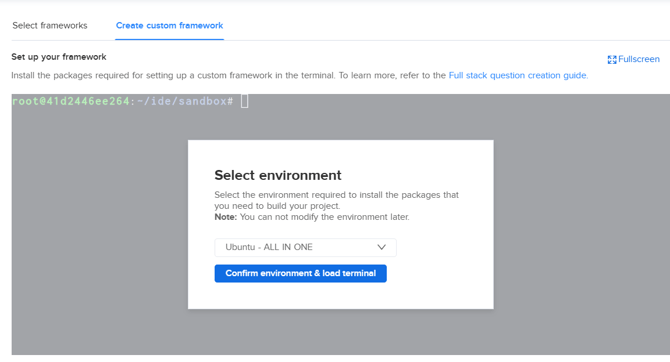
2\. Install all the infrastructure dependencies that the question project needs, through the command-line interface. These could be programming languages, frontend/backend frameworks, or databases required for the question. The installation works similarly to how it would in a Linux environment.
3\. Add the names of the front-end and back-end frameworks that you have set up. There is no technical dependency but this will make it easier to identify them in the candidate assessment reports.
4\. Upload the question project with all the folders and files. There is no limitation on the folder structure or file naming as long as you map and mention them properly. You can refer to our full-stack boilerplate templates [here](https://bitbucket.org/hackerearth-fullstack/workspace/projects/BOIL) to get started.

*Notes*
- Do not use the given boilerplate templates as it is in an actual test environment. It is intended to serve as a sample project in order to help you get started.
- Make sure that the project folder is less than 5 MB in size.
- All the files or folders (if any) that are not a part of the backend and frontend must be put inside the *root* folder.
- There should only be a single root folder (example: *src)*.
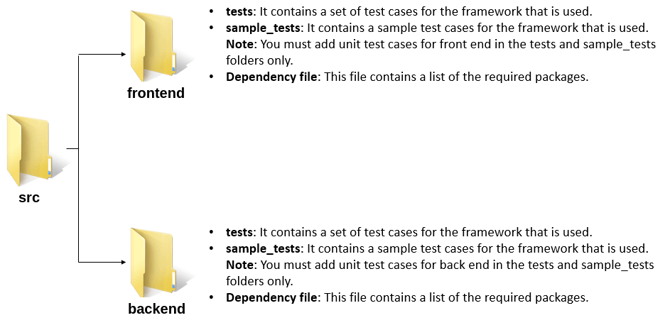
**Folder structure**
To explain subsequent steps, We will be using a sample project with react as the front end and spring-boot as the back end. Open the project in GitHub or on your local machine to browse through the folder structure and files in detail.
Link to the React-Spring sample project: [Project](https://bitbucket.org/hackerearth-fullstack/workspace/projects/BOIL)
5\. Once the project is uploaded, You can directly view, edit and make changes to the uploaded files from the interface if needed. Don’t forget to **Save Project** after making any changes to the project.
We recommend keeping the frontend and backend files in separate master folders as shown below for ease of access and readability.
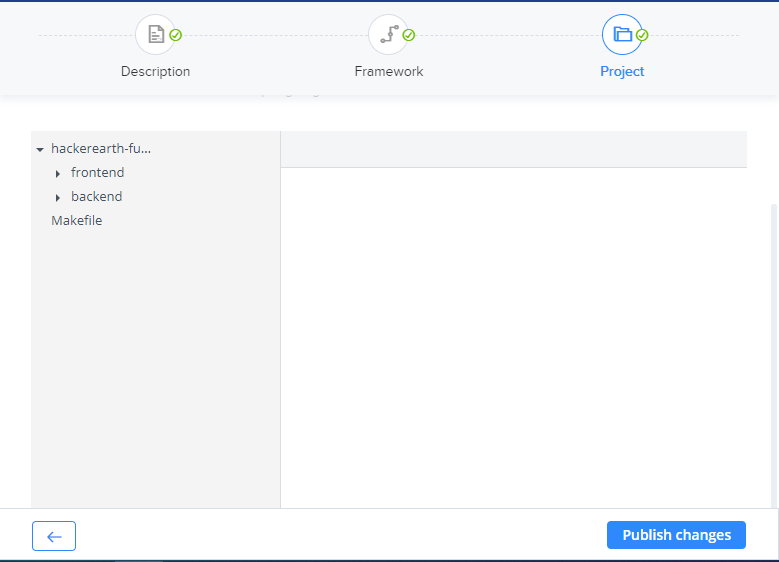
6\. Scroll down to the **Settings and configuration** section below the project editor. This section is for entering build, deploy, and evaluation commands for the frontend and backend. You will have to go through the below steps separately for the frontend and backend. Make sure you correctly enter and verify these commands.
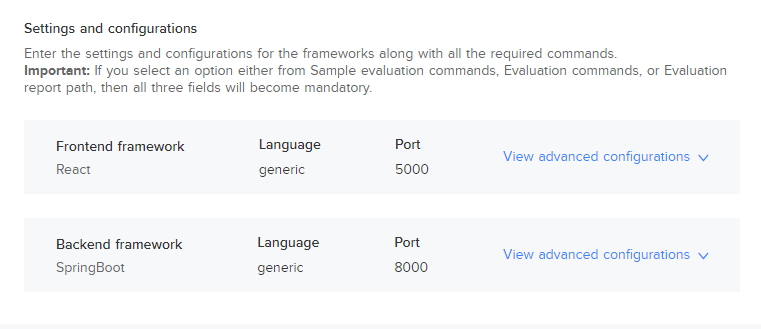
*Note*: Only Port 5000 and Port 8000 are available for frontend and backend respectively, please make sure that the port numbers are the same in your files and commands throughout the project.
**Make settings in Settings and configurations**
1\. In the **Project source** field, select the source folder for all frontend/backend files.
For our sample project,
- The source folder is named **frontend** for the frontend.
**
- The source folder is named **backend** for the backend.

2\. In the **Build commands** field, enter the build commands required to build the project. In case of multiple commands, Click **Add command** to add another line of command.
*For our sample project,*
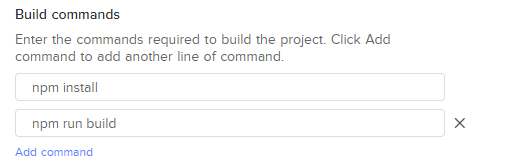
- The build command for the frontend is **npm install** and **npm run build** which will auto-download and build all the dependencies mentioned in the package.json file located in the frontend folder.
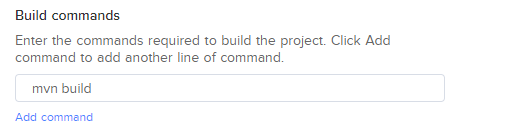
- Similarly, the build command for the backend is **mvn build**.
Be cognizant of how the build commands work and which files they pick dependencies from in case of the framework of your choosing.
3\. In the **Deploy commands** field, enter the commands required to deploy the project in the production server.
For our sample project,
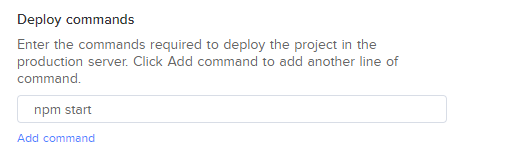
- The deploy command for the frontend is “npm start”, which will execute all the node.js commands listed under the hackerearth-fs-spring-react-sample\\frontend\\package.json file's **scripts\>start** section.
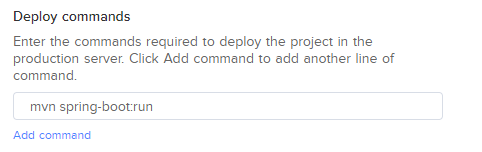
- The deploy command for the backend is **mvn spring-boot:run**
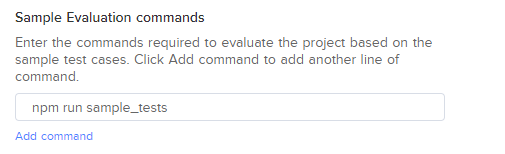
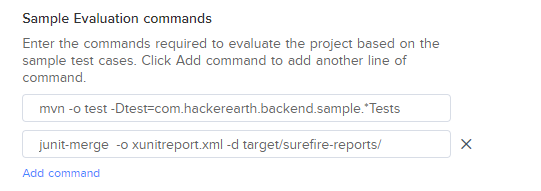
4\. In the **Sample Evaluation commands** field, enter the commands required to evaluate the project based on the sample test cases.
For our sample project,
- The sample evaluation command for the frontend is “npm run sample\_tests”, which will evaluate the test cases present in the hackerearth-fs-spring-react-sample\\frontend\\sample.test.js file.
- The sample evaluation command for the backend is “mvn test -Dtest=com.hackerearth.backend.sample.\*Tests ”, which will evaluate the test cases present in the hackerearth-fs-spring-react-sample\\backend\\src\\test\\java\\com\\hackerearth\\fullstack\\backend\\sample\\sampletests file.
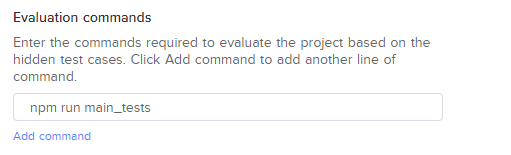
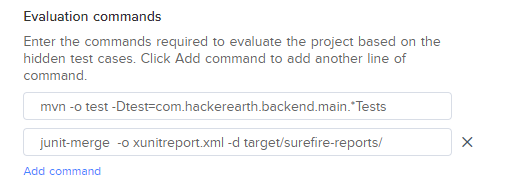
5\. In the **Evaluation commands** field, enter the commands required to evaluate the project based on the main test cases (ensure that these cases are hidden - refer to the notes below).
For our sample project,
- The sample evaluation command for the frontend is “npm run main\_tests”, which will evaluate the test cases present in the hackerearth-fs-spring-react-sample\\frontend\\main.test.js file.
- The evaluation command for the backend is “mvn test -Dtest=com.hackerearth.backend.main.\*Tests ”, which will evaluate the test cases present in the hackerearth-fs-spring-react-sample\\backend\\src\\test\\java\\com\\hackerearth\\fullstack\\backend\\main\\BackendApplicationTests file.
*Notes*
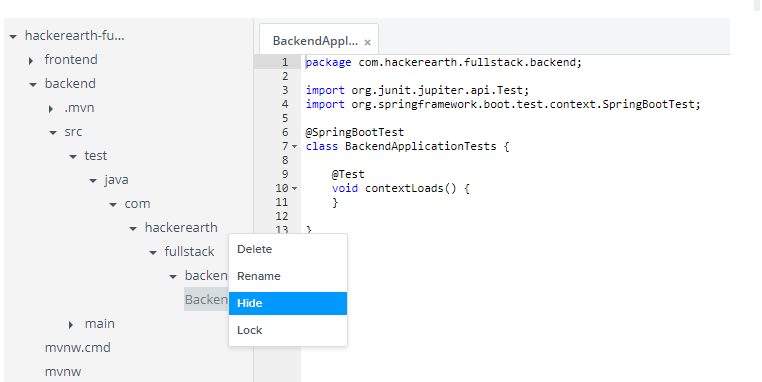
- Ensure folder/files containing maint test cases are marked as hidden while creating the question to prevent the candidate from viewing them.
- To hide a file or a folder, go to the project editor, right-click on the file/folder containing main test cases and select “Hide” from the menu. Refer to the below image.
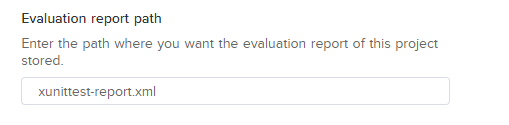
6\. In the **Evaluation report path** field, Enter the path where the evaluation report of this project is stored. The file is parsed as per junit and xunit formats and hence the output file can be in either format. Ensure that this file is in xml format.
*For our sample project,*
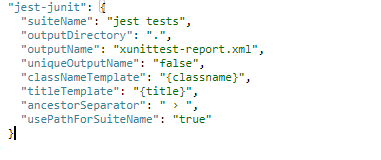
- In case of the frontend, The package.json file contains junit as a dev dependency and also all the junit-related configurations. Note that the “outputDirectory” and “outputName” parameter is consistent with the Evaluation Report path field in the UI.
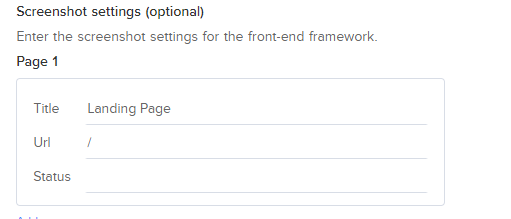
7\. **Screenshot settings** is an optional field for the frontend whereby you can mention the URL of a page, which would then be captured and shown in the candidate report.
**FAQ**
## **How do I set up MongoDB with nodejs?**
- Install MongoDB through the terminal. You can refer to [this guide](https://docs.mongodb.com/manual/tutorial/install-mongodb-on-ubuntu/) for detailed steps involving installation.
- Make sure that you create/modify user, password and other connection attributes that will be required by nodjs driver to connect to MongoDB.
- Check if your project has a package.json file, if not set up NPM for your project by running the following command “npm init -y”. This command creates the package.json file.
- Next, add the official Node.js MongoDB driver to your project dependencies. Use the following command “npm install mongodb” to instruct NPM to download and install the mongodb package. This command downloads the mongodb package and dependencies required for its installation and saves them into a directory called node\_modules in your project directory, and records the dependency information in the package.json file you generated in the previous step.
- Node.js can now use this module to manipulate MongoDB databases. Additional details can be found [here.](https://docs.mongodb.com/drivers/node/quick-start/)
## **How do I set up MySQL with spring-boot?**
- Install the MySQL database through the terminal.
- Setup the MYSQL, To do this, run the below commands inside the terminal and open the MySQL console.
- ```
mysqld --user=root &mysql -uroot -p
```
- It will prompt for password enter: mypassword
- Now enter the below SQL queries in the MySQL console.
```
create database main_db;exit
```
- Setup the database as per the question requirements i.e create tables, data, etc.
- Add a dependency for the MySQL connector to your maven POM.xml file. You can generate the relevant snippets [here.](https://mvnrepository.com/artifact/mysql/mysql-connector-java%20or%20https://start.spring.io/)
- Update the application.properties file in your source folder to configure the connection to the database.
- Refer to [this guide](https://spring.io/guides/gs/accessing-data-mysql/) for more details or refer to this [article](https://spring.io/guides/gs/accessing-data-mongodb/).
- [Assessments: Recruiters](https://help.hackerearth.com/assessments-recruiters#main-content)
- [Getting started](https://help.hackerearth.com/assessments-recruiters#getting-started)
- [Account settings](https://help.hackerearth.com/assessments-recruiters#account-settings)
- [Admin management](https://help.hackerearth.com/assessments-recruiters#admin-management)
- [Creating tests automatically](https://help.hackerearth.com/assessments-recruiters#creating-tests-automatically)
- [Creating tests manually](https://help.hackerearth.com/assessments-recruiters#creating-tests-manually)
- [Test settings](https://help.hackerearth.com/assessments-recruiters#test-settings)
- [Sections and question pooling](https://help.hackerearth.com/assessments-recruiters#sections-and-question-pooling)
- [Libraries](https://help.hackerearth.com/assessments-recruiters#libraries)
- [Multiple Choice Questions (MCQs)](https://help.hackerearth.com/assessments-recruiters#multiple-choice-questions-mcqs)
- [Programming](https://help.hackerearth.com/assessments-recruiters#programming)
- [Project](https://help.hackerearth.com/assessments-recruiters#project)
- [SQL](https://help.hackerearth.com/assessments-recruiters#sql)
- [Data science](https://help.hackerearth.com/assessments-recruiters#data-science)
- [Machine Learning (ML)](https://help.hackerearth.com/assessments-recruiters#machine-learning-ml)
- [DevOps](https://help.hackerearth.com/assessments-recruiters#devops)
- [Python project questions](https://help.hackerearth.com/assessments-recruiters#python-project-questions)
- [Automation Testing](https://help.hackerearth.com/assessments-recruiters#automation-testing)
- [Java Project](https://help.hackerearth.com/assessments-recruiters#java-project)
- [C# project questions](https://help.hackerearth.com/assessments-recruiters#c-project-questions)
- [Subjective](https://help.hackerearth.com/assessments-recruiters#subjective)
- [Approximate](https://help.hackerearth.com/assessments-recruiters#approximate)
- [Diagram](https://help.hackerearth.com/assessments-recruiters#diagram)
- [File upload](https://help.hackerearth.com/assessments-recruiters#file-upload)
- [Invites](https://help.hackerearth.com/assessments-recruiters#invites)
- [Reports](https://help.hackerearth.com/assessments-recruiters#reports)
- [Billing](https://help.hackerearth.com/assessments-recruiters#billing)
- [HackerEarth Reports: Admins, Tests, and Teams](https://help.hackerearth.com/assessments-recruiters#hackerearth-reports-admins-tests-and-teams)
- [Technical Content Updates](https://help.hackerearth.com/assessments-recruiters#technical-content-updates)
- [FaceCode](https://help.hackerearth.com/facecode#main-content)
- [FaceCode and its features](https://help.hackerearth.com/facecode#facecode-and-its-features)
- [Scheduling interviews on FaceCode](https://help.hackerearth.com/facecode#scheduling-interviews-on-facecode)
- [Assessments: ATS integrations](https://help.hackerearth.com/assessments-ats-integrations#main-content)
- [Integration](https://help.hackerearth.com/assessments-ats-integrations#integration)
- [iCIMS](https://help.hackerearth.com/assessments-ats-integrations#icims)
- [Zoho Recruit](https://help.hackerearth.com/assessments-ats-integrations#zoho-recruit)
- [SmartRecruiters](https://help.hackerearth.com/assessments-ats-integrations#smartrecruiters)
- [EightFold](https://help.hackerearth.com/assessments-ats-integrations#eightfold)
- [SuccessFactors](https://help.hackerearth.com/assessments-ats-integrations#successfactors)
- [Greenhouse](https://help.hackerearth.com/assessments-ats-integrations#greenhouse)
- [Lever](https://help.hackerearth.com/assessments-ats-integrations#lever)
- [Linkedin Talent Hub](https://help.hackerearth.com/assessments-ats-integrations#linkedin-talent-hub)
- [JazzHR](https://help.hackerearth.com/assessments-ats-integrations#jazzhr)
- [Workable](https://help.hackerearth.com/assessments-ats-integrations#workable)
- [Recruiterbox - Trakstar Hire](https://help.hackerearth.com/assessments-ats-integrations#recruiterbox-trakstar-hire)
- [Jobvite](https://help.hackerearth.com/assessments-ats-integrations#jobvite)
- [Ashby](https://help.hackerearth.com/assessments-ats-integrations#ashby)
- [Assessments: Product updates](https://help.hackerearth.com/assessments-product-updates#main-content)
- [Release notes: HackerEarth Assessment](https://help.hackerearth.com/assessments-product-updates#release-notes-hackerearth-assessment)
- [Root Cause Analysis (RCA)](https://help.hackerearth.com/assessments-product-updates#root-cause-analysis-rca)
- [Content updates](https://help.hackerearth.com/assessments-product-updates#content-updates)
- [Assessments: Best practices](https://help.hackerearth.com/assessments-best-practices#main-content)
- [Recruit](https://help.hackerearth.com/assessments-best-practices#recruit)
- [SSO](https://help.hackerearth.com/sso#main-content)
- [SSO](https://help.hackerearth.com/sso#sso)
- [Upskilling](https://help.hackerearth.com/upskilling#main-content)
- [Introduction: Upskilling](https://help.hackerearth.com/upskilling#introduction-upskilling)
- [Assessments: Candidates](https://help.hackerearth.com/assessments-candidates#main-content)
- [Getting started](https://help.hackerearth.com/assessments-candidates#getting-started)
- [Test environment](https://help.hackerearth.com/assessments-candidates#test-environment)
- [Question types](https://help.hackerearth.com/assessments-candidates#question-types)
- [FaceCode](https://help.hackerearth.com/assessments-candidates#facecode)
- [Feedback and queries](https://help.hackerearth.com/assessments-candidates#feedback-and-queries)
- [Problem setting for HackerEarth](https://help.hackerearth.com/problem-setting-for-hackerearth#main-content)
- [Rate cards](https://help.hackerearth.com/problem-setting-for-hackerearth#rate-cards)
- [Campus](https://help.hackerearth.com/campus#main-content)
- [Recruiters](https://help.hackerearth.com/campus#recruiters)
- [Recruiter FAQs](https://help.hackerearth.com/campus#recruiter-faqs)
- [Candidate FAQs](https://help.hackerearth.com/campus#candidate-faqs)
- [Hackathons and Hiring Challenges](https://help.hackerearth.com/hackathons-and-hiring-challenges#main-content)
- [Hackathons](https://help.hackerearth.com/hackathons-and-hiring-challenges#hackathons)
- [Hiring challenges](https://help.hackerearth.com/hackathons-and-hiring-challenges#hiring-challenges)
- [Frequently Asked Questions (FAQs)](https://help.hackerearth.com/frequently-asked-questions-faqs#main-content)
- [Assessments: Recruiters](https://help.hackerearth.com/frequently-asked-questions-faqs#assessments-recruiters)
- [GDPR compliance (Candidates)](https://help.hackerearth.com/frequently-asked-questions-faqs#gdpr-compliance-candidates)
- [GDPR compliance (Recruiters)](https://help.hackerearth.com/frequently-asked-questions-faqs#gdpr-compliance-recruiters)
- [General](https://help.hackerearth.com/frequently-asked-questions-faqs#general)
- [Assessments: Candidates](https://help.hackerearth.com/frequently-asked-questions-faqs#assessments-candidates)
- [HackerEarth Vs ChatGPT](https://help.hackerearth.com/frequently-asked-questions-faqs#hackerearth-vs-chatgpt)
- [Profiles](https://help.hackerearth.com/profiles#main-content)
- [Profiles - Recruiter](https://help.hackerearth.com/profiles#profiles-recruiter)
- [OnScreen](https://help.hackerearth.com/onscreen#main-content)
- [OnScreen - Interview templates](https://help.hackerearth.com/onscreen#onscreen-interview-templates)
- [OnScreen - Sending Invites](https://help.hackerearth.com/onscreen#onscreen-sending-invites)
- [OnScreen - Download reports](https://help.hackerearth.com/onscreen#onscreen-download-reports)
- [OnScreen - Interview Analytics](https://help.hackerearth.com/onscreen#onscreen-interview-analytics)
- [OnScreen - Overview](https://help.hackerearth.com/onscreen#onscreen-overview)
- [OnScreen - Interview Proctoring Settings](https://help.hackerearth.com/onscreen#onscreen-interview-proctoring-settings)
[](https://www.hackerearth.com/)
##### The skills intelligence platform for the AI era. Evaluate developers, candidates, and AI agents.
© 2026 HackerEarth · All rights reserved