
Open the question report
The question report shows how candidates performed on each question in a test, grouped by question type.
To view the question report of a specific test, follow these steps:
- Log in to the HackerEarth portal by using your admin credentials.
- Click Assessments.
- Click the name of the assessments whose question report you want to view.
- Click the Test analysis tab.
- In the left panel, click Question analytics
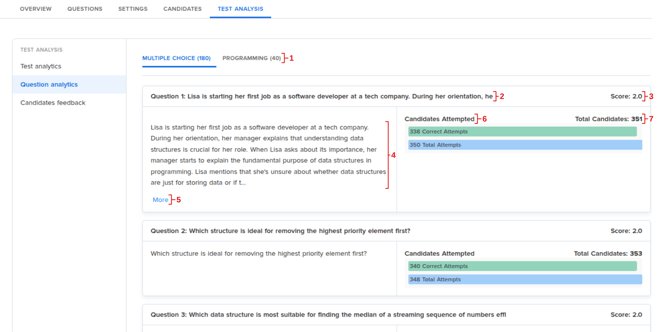
You have successfully accessed the questions report of your test. The report is displayed as follows:
| S.No. | Description |
|
1 |
The types of questions in the test. The number in brackets is the number of questions of that type. Click a tab to view its questions. |
|
2 |
The question number and name. |
|
3 |
The score assigned to the question. |
|
4 |
The description of the question. |
|
5 |
Click More to view the full question. |
|
6 |
The number of candidates who attempted the question. This section shows the number of correct attempts and total attempts. |
|
7 |
The total number of candidates who took the test. |