---
title: "Question templates: create, tag, and filter"
description: "Question templates: create, tag, and filter"
---
[Skip to content](https://help.hackerearth.com/question-templates#main-content)

Open main navigation
Close main navigation
Hello. How can we help you?
- There are no suggestions because the search field is empty.
1. [Help Center](https://help.hackerearth.com/?hsLang=en)
2. [Assessments: Recruiters](https://help.hackerearth.com/assessments-recruiters?hsLang=en)
3. [Libraries](https://help.hackerearth.com/assessments-recruiters?hsLang=en#libraries)
# Question templates: create, tag, and filter
Templates help you organize and discover questions more easily. You can group related questions under a template, then use that template to quickly filter and locate questions — both in the Library and while building a test in FaceCode.
What are templates?
- Templates are created and managed in the **Library**.
- Templates can only be added to **published** questions.
- A single template can be linked to multiple questions, and a single question can be linked to multiple templates.
Creating a template and adding questions to it
1. Open the **Library** on your HackerEarth account.
2. Click on any published question to open it.
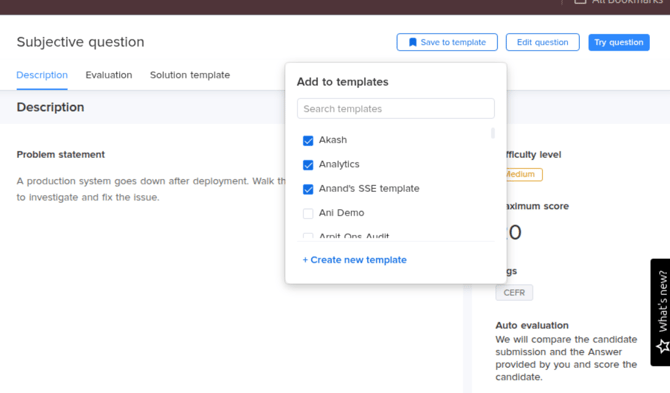
3. Click **Save to template** (top right of the question view).
4. In the **Add to templates** panel that opens, you can:
- Check one or more existing templates to add this question to them, or
- Click **+ Create new template**, enter a name, and click **Create**. The new template will now appear in the list and gets applied to the question.
Filtering questions by template in the Library
1. In the Library, go to the filters panel on the left.
2. Scroll down to the **Templates** section.
3. Click **Choose templates** to open the dropdown, and select one or more templates.
-png.png?width=150&height=341&name=image%20(18)-png.png)
4. Confirm your selection (using **Apply**, in the same pattern used by other multi-select filters in the Library).
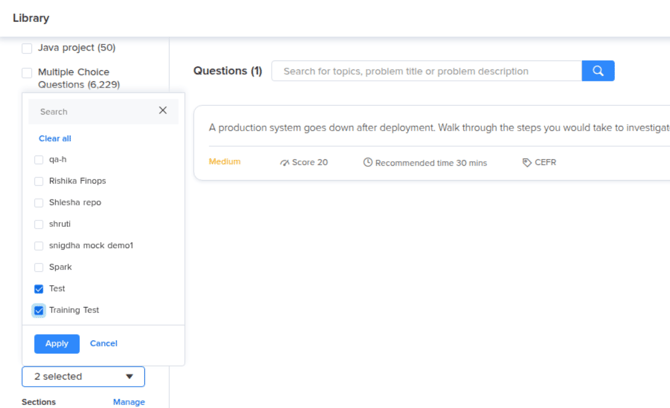
5. The question list updates to show only questions tagged with the selected template(s).
Filtering by template in FaceCode
The same template-based filter is now available in **FaceCode**, so you can quickly find and add questions created from templates in the Library while building a test.
1. In FaceCode, open **Choose from library**.
2. In the left panel, under **Templates**, select one or more templates to filter by.
3. The question list on the right updates to show only questions belonging to the selected template(s).
-png-1.png?width=2290&height=1190&name=image%20(17)-png-1.png)
- [Assessments: Recruiters](https://help.hackerearth.com/assessments-recruiters?hsLang=en#main-content)
- [Getting started](https://help.hackerearth.com/assessments-recruiters?hsLang=en#getting-started)
- [Account settings](https://help.hackerearth.com/assessments-recruiters?hsLang=en#account-settings)
- [Admin management](https://help.hackerearth.com/assessments-recruiters?hsLang=en#admin-management)
- [Creating tests automatically](https://help.hackerearth.com/assessments-recruiters?hsLang=en#creating-tests-automatically)
- [Creating tests manually](https://help.hackerearth.com/assessments-recruiters?hsLang=en#creating-tests-manually)
- [Test settings](https://help.hackerearth.com/assessments-recruiters?hsLang=en#test-settings)
- [Sections and question pooling](https://help.hackerearth.com/assessments-recruiters?hsLang=en#sections-and-question-pooling)
- [Libraries](https://help.hackerearth.com/assessments-recruiters?hsLang=en#libraries)
- [Multiple Choice Questions (MCQs)](https://help.hackerearth.com/assessments-recruiters?hsLang=en#multiple-choice-questions-mcqs)
- [Programming](https://help.hackerearth.com/assessments-recruiters?hsLang=en#programming)
- [Project](https://help.hackerearth.com/assessments-recruiters?hsLang=en#project)
- [SQL](https://help.hackerearth.com/assessments-recruiters?hsLang=en#sql)
- [Data science](https://help.hackerearth.com/assessments-recruiters?hsLang=en#data-science)
- [Machine Learning (ML)](https://help.hackerearth.com/assessments-recruiters?hsLang=en#machine-learning-ml)
- [DevOps](https://help.hackerearth.com/assessments-recruiters?hsLang=en#devops)
- [Python project questions](https://help.hackerearth.com/assessments-recruiters?hsLang=en#python-project-questions)
- [Automation Testing](https://help.hackerearth.com/assessments-recruiters?hsLang=en#automation-testing)
- [Java Project](https://help.hackerearth.com/assessments-recruiters?hsLang=en#java-project)
- [C# project questions](https://help.hackerearth.com/assessments-recruiters?hsLang=en#c-project-questions)
- [Subjective](https://help.hackerearth.com/assessments-recruiters?hsLang=en#subjective)
- [Approximate](https://help.hackerearth.com/assessments-recruiters?hsLang=en#approximate)
- [Diagram](https://help.hackerearth.com/assessments-recruiters?hsLang=en#diagram)
- [File upload](https://help.hackerearth.com/assessments-recruiters?hsLang=en#file-upload)
- [Invites](https://help.hackerearth.com/assessments-recruiters?hsLang=en#invites)
- [Reports](https://help.hackerearth.com/assessments-recruiters?hsLang=en#reports)
- [Billing](https://help.hackerearth.com/assessments-recruiters?hsLang=en#billing)
- [HackerEarth Reports: Admins, Tests, and Teams](https://help.hackerearth.com/assessments-recruiters?hsLang=en#hackerearth-reports-admins-tests-and-teams)
- [Technical Content Updates](https://help.hackerearth.com/assessments-recruiters?hsLang=en#technical-content-updates)
- [FaceCode](https://help.hackerearth.com/facecode?hsLang=en#main-content)
- [FaceCode and its features](https://help.hackerearth.com/facecode?hsLang=en#facecode-and-its-features)
- [Scheduling interviews on FaceCode](https://help.hackerearth.com/facecode?hsLang=en#scheduling-interviews-on-facecode)
- [Assessments: ATS integrations](https://help.hackerearth.com/assessments-ats-integrations?hsLang=en#main-content)
- [Integration](https://help.hackerearth.com/assessments-ats-integrations?hsLang=en#integration)
- [iCIMS](https://help.hackerearth.com/assessments-ats-integrations?hsLang=en#icims)
- [Zoho Recruit](https://help.hackerearth.com/assessments-ats-integrations?hsLang=en#zoho-recruit)
- [SmartRecruiters](https://help.hackerearth.com/assessments-ats-integrations?hsLang=en#smartrecruiters)
- [EightFold](https://help.hackerearth.com/assessments-ats-integrations?hsLang=en#eightfold)
- [SuccessFactors](https://help.hackerearth.com/assessments-ats-integrations?hsLang=en#successfactors)
- [Greenhouse](https://help.hackerearth.com/assessments-ats-integrations?hsLang=en#greenhouse)
- [Lever](https://help.hackerearth.com/assessments-ats-integrations?hsLang=en#lever)
- [Linkedin Talent Hub](https://help.hackerearth.com/assessments-ats-integrations?hsLang=en#linkedin-talent-hub)
- [JazzHR](https://help.hackerearth.com/assessments-ats-integrations?hsLang=en#jazzhr)
- [Workable](https://help.hackerearth.com/assessments-ats-integrations?hsLang=en#workable)
- [Recruiterbox - Trakstar Hire](https://help.hackerearth.com/assessments-ats-integrations?hsLang=en#recruiterbox-trakstar-hire)
- [Jobvite](https://help.hackerearth.com/assessments-ats-integrations?hsLang=en#jobvite)
- [Ashby](https://help.hackerearth.com/assessments-ats-integrations?hsLang=en#ashby)
- [Assessments: Product updates](https://help.hackerearth.com/assessments-product-updates?hsLang=en#main-content)
- [Release notes: HackerEarth Assessment](https://help.hackerearth.com/assessments-product-updates?hsLang=en#release-notes-hackerearth-assessment)
- [Root Cause Analysis (RCA)](https://help.hackerearth.com/assessments-product-updates?hsLang=en#root-cause-analysis-rca)
- [Content updates](https://help.hackerearth.com/assessments-product-updates?hsLang=en#content-updates)
- [Assessments: Best practices](https://help.hackerearth.com/assessments-best-practices?hsLang=en#main-content)
- [Recruit](https://help.hackerearth.com/assessments-best-practices?hsLang=en#recruit)
- [SSO](https://help.hackerearth.com/sso?hsLang=en#main-content)
- [SSO](https://help.hackerearth.com/sso?hsLang=en#sso)
- [Upskilling](https://help.hackerearth.com/upskilling?hsLang=en#main-content)
- [Introduction: Upskilling](https://help.hackerearth.com/upskilling?hsLang=en#introduction-upskilling)
- [Assessments: Candidates](https://help.hackerearth.com/assessments-candidates?hsLang=en#main-content)
- [Getting started](https://help.hackerearth.com/assessments-candidates?hsLang=en#getting-started)
- [Test environment](https://help.hackerearth.com/assessments-candidates?hsLang=en#test-environment)
- [Question types](https://help.hackerearth.com/assessments-candidates?hsLang=en#question-types)
- [FaceCode](https://help.hackerearth.com/assessments-candidates?hsLang=en#facecode)
- [Feedback and queries](https://help.hackerearth.com/assessments-candidates?hsLang=en#feedback-and-queries)
- [Problem setting for HackerEarth](https://help.hackerearth.com/problem-setting-for-hackerearth?hsLang=en#main-content)
- [Rate cards](https://help.hackerearth.com/problem-setting-for-hackerearth?hsLang=en#rate-cards)
- [Campus](https://help.hackerearth.com/campus?hsLang=en#main-content)
- [Recruiters](https://help.hackerearth.com/campus?hsLang=en#recruiters)
- [Recruiter FAQs](https://help.hackerearth.com/campus?hsLang=en#recruiter-faqs)
- [Candidate FAQs](https://help.hackerearth.com/campus?hsLang=en#candidate-faqs)
- [Hackathons and Hiring Challenges](https://help.hackerearth.com/hackathons-and-hiring-challenges?hsLang=en#main-content)
- [Hackathons](https://help.hackerearth.com/hackathons-and-hiring-challenges?hsLang=en#hackathons)
- [Hiring challenges](https://help.hackerearth.com/hackathons-and-hiring-challenges?hsLang=en#hiring-challenges)
- [Frequently Asked Questions (FAQs)](https://help.hackerearth.com/frequently-asked-questions-faqs?hsLang=en#main-content)
- [Assessments: Recruiters](https://help.hackerearth.com/frequently-asked-questions-faqs?hsLang=en#assessments-recruiters)
- [GDPR compliance (Candidates)](https://help.hackerearth.com/frequently-asked-questions-faqs?hsLang=en#gdpr-compliance-candidates)
- [GDPR compliance (Recruiters)](https://help.hackerearth.com/frequently-asked-questions-faqs?hsLang=en#gdpr-compliance-recruiters)
- [General](https://help.hackerearth.com/frequently-asked-questions-faqs?hsLang=en#general)
- [Assessments: Candidates](https://help.hackerearth.com/frequently-asked-questions-faqs?hsLang=en#assessments-candidates)
- [HackerEarth Vs ChatGPT](https://help.hackerearth.com/frequently-asked-questions-faqs?hsLang=en#hackerearth-vs-chatgpt)
- [Profiles](https://help.hackerearth.com/profiles?hsLang=en#main-content)
- [Profiles - Recruiter](https://help.hackerearth.com/profiles?hsLang=en#profiles-recruiter)
- [OnScreen](https://help.hackerearth.com/onscreen?hsLang=en#main-content)
- [OnScreen - Interview templates](https://help.hackerearth.com/onscreen?hsLang=en#onscreen-interview-templates)
- [OnScreen - Sending Invites](https://help.hackerearth.com/onscreen?hsLang=en#onscreen-sending-invites)
- [OnScreen - Download reports](https://help.hackerearth.com/onscreen?hsLang=en#onscreen-download-reports)
- [OnScreen - Interview Analytics](https://help.hackerearth.com/onscreen?hsLang=en#onscreen-interview-analytics)
- [OnScreen - Overview](https://help.hackerearth.com/onscreen?hsLang=en#onscreen-overview)
- [OnScreen - Interview Proctoring Settings](https://help.hackerearth.com/onscreen?hsLang=en#onscreen-interview-proctoring-settings)
[](https://www.hackerearth.com/)
##### The skills intelligence platform for the AI era. Evaluate developers, candidates, and AI agents.
© 2026 HackerEarth · All rights reserved