
SmartBrowser Update: Smarter Preflight Checks
Preflight system checks now follow the assessment's webcam and microphone policy, so candidates are only prompted for the media that the event actually needs.
Version: 3.0.4
Date: August 6, 2026
What's new
- Camera and microphone requirements are now resolved for the event before permission and media checks run.
- Candidates will no longer see camera and/or microphone steps (or the related OS prompts) when the assessment doesn't require them.
- Interview sessions, and cases where requirements can't be determined, will continue to require both camera and mic as a fail-safe.
Note:
Candidates using SmartBrowser versions earlier than v2.9.3 will no longer be able to access assessments or interviews through SmartBrowser.
Ensure all candidates are upgraded to SmartBrowser v2.9.3 or later before attempting to start a test or interview, to avoid access disruption.
Granular Admin Access Controls
We've rolled out granular, per-test admin permissions, giving you better control over what each test admin can access and manage.
What's new
Permissions can now be managed from Test Overview → Test admins table → Edit access under Access controls, with the following available:
- Overview (always enabled)
- Questions
- Invite candidates
- Settings
- Manage admins
- Test analysis
- Candidate reports (Test taken, Review pending, Shortlisted, etc.)
.png?width=670&height=435&name=image%20(20).png)
How it works
- Admin management is now permission-gated — only admins with Manage admins access can view the admin list or modify other admins' permissions.
- Each admin will only see the sections they've been given access to.
- Super Admin accounts always retain full access and cannot be modified.
- Admins cannot edit their own permissions.
- Existing setups aren't affected — legacy roles (All access, Questions only, Reports only, etc.) continue to work as before.
-1.png?width=670&height=128&name=image%20(21)-1.png)
Stronger Proctoring Suite: Audio Proctoring Now Part of the Integrity Index
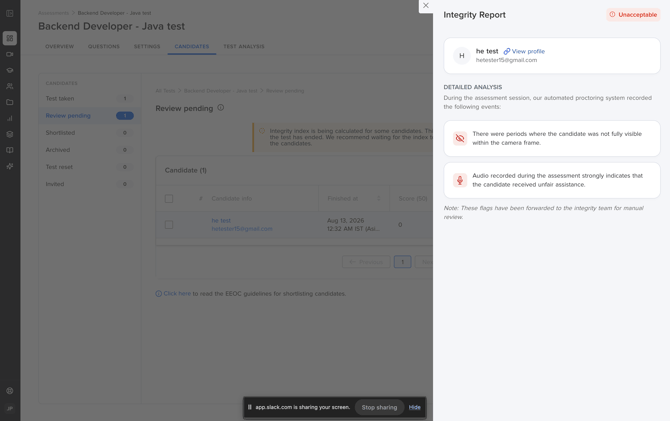
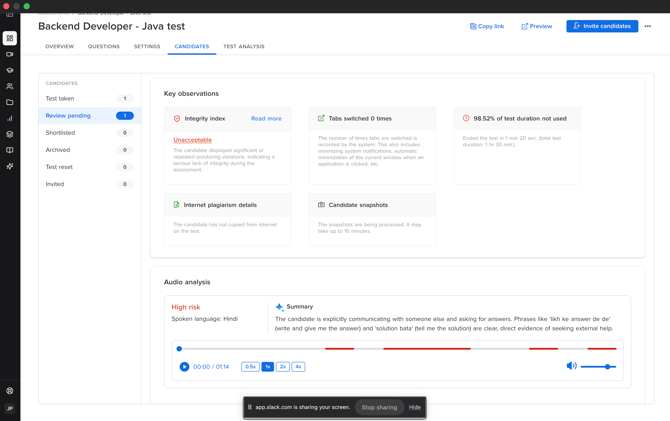
Audio Proctoring is now faster and more reliable, and its signals are fully integrated into the Integrity Index — giving you a more comprehensive view of candidate integrity.
What's new
- Faster, more reliable Audio Proctoring processing and response times.
- Audio Proctoring signals now contribute directly to the Integrity Index for events published after August 11, 2026.
- A high_risk Audio Proctoring result triggers a major deduction in the Integrity Index; a needs_review result triggers a minor deduction — using the same scoring methodology as other proctoring violations, for a consistent approach across the Integrity Index.
How it works
- When enabling Audio Proctoring, admins specify whether the test is group-based or non-group-based:
- Group-based tests: audio is recorded but not processed for proctoring.
- Non-group-based tests: recorded audio is processed for Audio Proctoring as expected.
Good to know
- For subjective questions where candidates record a video answer, that video-answer segment is skipped entirely from Audio Proctoring — audio captured during it is not processed. Audio Proctoring continues to analyze applicable audio outside these segments.
Now Evaluate AI Fluency during Interviews
For companies with AI-supported assessments enabled, the AI Assistant will now automatically turn on for supported questions in interviews — no extra setup needed.
What's new
- Adding a Project or Automation Testing question that supports the AI Assistant to an interview will automatically enable the AI Assistant for that question in the IDE.
- No additional configuration is required from the interviewer.
Availability
- This applies to companies with the AI-supported assessments feature enabled on their plan. Reach out to your Account Manager to check if this is enabled for your account.