---
title: Send invites to candidates by entry or bulk upload
description: The article talks about how to invite the candidates to take the assessment.
---
[Skip to content](https://help.hackerearth.com/sending-invites-to-candidates#main-content)

Open main navigation
Close main navigation
Hello. How can we help you?
- There are no suggestions because the search field is empty.
1. [Help Center](https://help.hackerearth.com/)
2. [Assessments: Recruiters](https://help.hackerearth.com/assessments-recruiters)
3. [Invites](https://help.hackerearth.com/assessments-recruiters#invites)
# Send invites to candidates by entry or bulk upload
## The article talks about how to invite the candidates to take the assessment.
In this article, you will learn how to:
- [Invite candidates to a test by manually entering their information](https://help.hackerearth.com/sending-invites-to-candidates#manual)
- [Invite candidates to a test using the bulk upload](https://help.hackerearth.com/sending-invites-to-candidates#bulk-upload)
To invite candidates, follow these steps:
1\. Log in to your HackerEarth Recruit account using your admin credentials.
2\. Click **Assessments.**
3\. Navigate to the assessment for which you want to invite candidates. Click **Invite candidates**.

*Important:* You must publish the assessment to invite candidates.
4\. You can also select the assessment and then click **Invite candidates**.

5\. You can invite the candidates by either of the two methods:
## **Inviting candidates by entering their information**
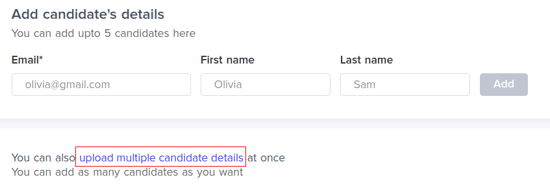
You can only invite up to 5 candidates using this method. You need to enter the following information:
1. 1. 1. Email (mandatory)
2. First name
3. Last name
Click **Add** to add the candidate to the invite list.
## **Inviting the candidates through bulk upload**
1\. Click **upload multiple candidate detail**.
2\. To download the sample file, click **Download sample template.**
3. Fill out the sheet with your candidates' details, then upload it by clicking **Upload file**.
- Only the first sheet of the Excel file is considered.
- Email ID is mandatory for each candidate.
- You can add a maximum of 5 tags per candidate.
4. Once your file is uploaded successfully, choose a **Delivery schedule**:
- **Send immediately** — invites go out as soon as you click Invite candidates.
- **Schedule for later** — pick a date and time (in your profile's timezone) for the invites to be sent.
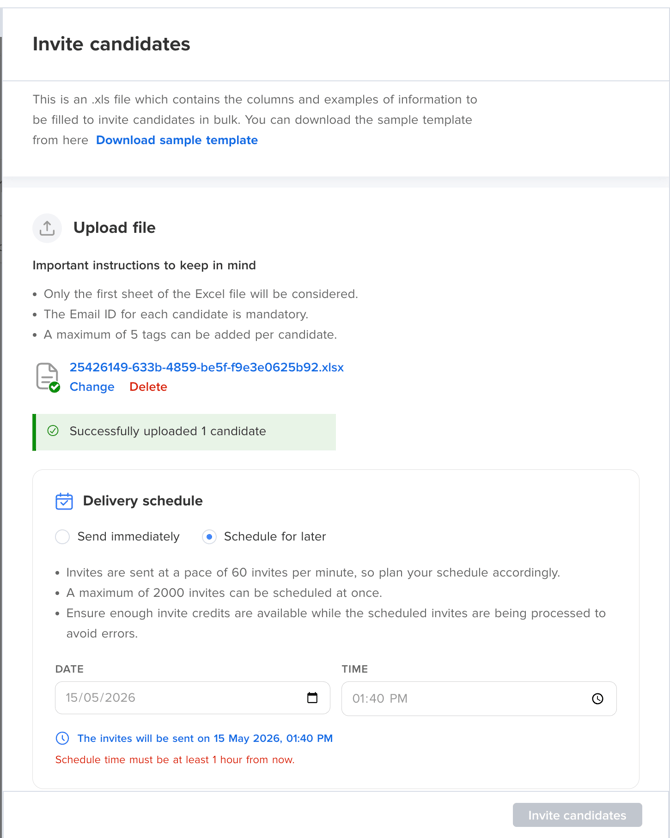
5\. If you choose to schedule for later, enter the date and time. This must be:
- - At least 1 hour from the current time, and
- No more than 60 days from now, or the test's end date — whichever comes first.
6\. Optionally, set an Invite expiration date. Enter the date on which the test invite expires, in DD/MM/YY format. The invite expires at 11:59:59 PM IST on the date that you select, and candidates cannot start the test after that time.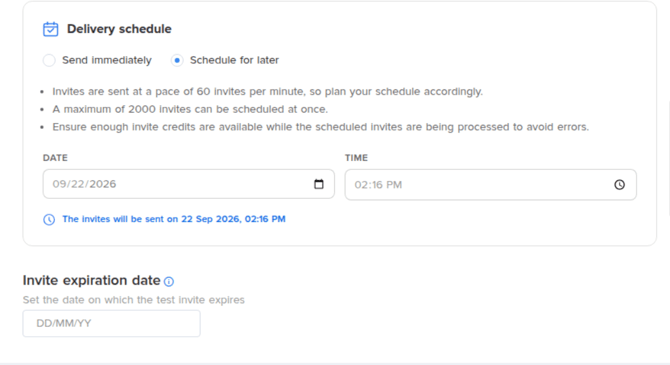
7\. Click Invite candidates to confirm.
A notification will appear at the top of your screen once you have successfully invited candidates to take the test.

A few things to keep in mind while scheduling:
- Invites are sent at a pace of about 60 per minute, so plan accordingly if you're working close to a deadline.
- Up to 2,000 rows can be scheduled in a single batch.
- Make sure you have enough invite credits available for when the scheduled job runs — the invites will fail to send if you run out.
### Managing an active schedule
Only one bulk invite schedule can be active per test at a time. Once a schedule is created, you'll see a banner confirming the scheduled date and time, along with a **Cancel schedule** button.
If you need to change the candidate file or the scheduled time, you'll need to cancel the existing schedule first, then upload a new file and set up a new schedule.
### What happens when the scheduled invites go out
Once the scheduled job runs, the admin who set up the schedule receives an email with the outcome:
- **Success** — all invites were dispatched. The email includes the test name, dispatch time (with timezone), total candidates uploaded, invites sent, and a link to view the invited candidates on your dashboard.
- **Partial success** — invites were dispatched, but some rows in the uploaded file couldn't be processed (for example, due to invalid email addresses). The email includes the same summary, plus a note that rows were skipped. A detailed error report is attached when available.
- **Failed** — none of the invites could be sent. The email includes the reason for the failure (when known), a link to your dashboard, and any relevant attachments.
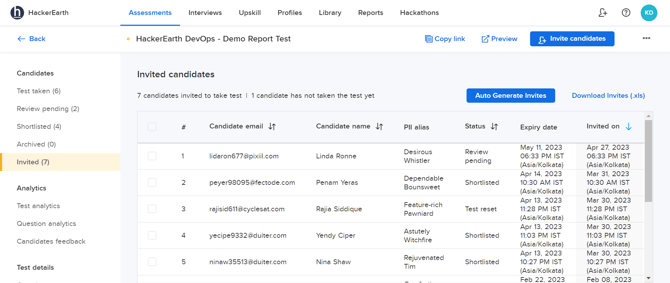
You can see all the invited candidates for the assessment under the **Candidates** section. Select **Invited,** and a list of invited candidates will be displayed.
- [Assessments: Recruiters](https://help.hackerearth.com/assessments-recruiters#main-content)
- [Getting started](https://help.hackerearth.com/assessments-recruiters#getting-started)
- [Account settings](https://help.hackerearth.com/assessments-recruiters#account-settings)
- [Admin management](https://help.hackerearth.com/assessments-recruiters#admin-management)
- [Creating tests automatically](https://help.hackerearth.com/assessments-recruiters#creating-tests-automatically)
- [Creating tests manually](https://help.hackerearth.com/assessments-recruiters#creating-tests-manually)
- [Test settings](https://help.hackerearth.com/assessments-recruiters#test-settings)
- [Sections and question pooling](https://help.hackerearth.com/assessments-recruiters#sections-and-question-pooling)
- [Libraries](https://help.hackerearth.com/assessments-recruiters#libraries)
- [Multiple Choice Questions (MCQs)](https://help.hackerearth.com/assessments-recruiters#multiple-choice-questions-mcqs)
- [Programming](https://help.hackerearth.com/assessments-recruiters#programming)
- [Project](https://help.hackerearth.com/assessments-recruiters#project)
- [SQL](https://help.hackerearth.com/assessments-recruiters#sql)
- [Data science](https://help.hackerearth.com/assessments-recruiters#data-science)
- [Machine Learning (ML)](https://help.hackerearth.com/assessments-recruiters#machine-learning-ml)
- [DevOps](https://help.hackerearth.com/assessments-recruiters#devops)
- [Python project questions](https://help.hackerearth.com/assessments-recruiters#python-project-questions)
- [Automation Testing](https://help.hackerearth.com/assessments-recruiters#automation-testing)
- [Java Project](https://help.hackerearth.com/assessments-recruiters#java-project)
- [C# project questions](https://help.hackerearth.com/assessments-recruiters#c-project-questions)
- [Subjective](https://help.hackerearth.com/assessments-recruiters#subjective)
- [Approximate](https://help.hackerearth.com/assessments-recruiters#approximate)
- [Diagram](https://help.hackerearth.com/assessments-recruiters#diagram)
- [File upload](https://help.hackerearth.com/assessments-recruiters#file-upload)
- [Invites](https://help.hackerearth.com/assessments-recruiters#invites)
- [Reports](https://help.hackerearth.com/assessments-recruiters#reports)
- [Billing](https://help.hackerearth.com/assessments-recruiters#billing)
- [HackerEarth Reports: Admins, Tests, and Teams](https://help.hackerearth.com/assessments-recruiters#hackerearth-reports-admins-tests-and-teams)
- [Technical Content Updates](https://help.hackerearth.com/assessments-recruiters#technical-content-updates)
- [FaceCode](https://help.hackerearth.com/facecode#main-content)
- [FaceCode and its features](https://help.hackerearth.com/facecode#facecode-and-its-features)
- [Scheduling interviews on FaceCode](https://help.hackerearth.com/facecode#scheduling-interviews-on-facecode)
- [Assessments: ATS integrations](https://help.hackerearth.com/assessments-ats-integrations#main-content)
- [Integration](https://help.hackerearth.com/assessments-ats-integrations#integration)
- [iCIMS](https://help.hackerearth.com/assessments-ats-integrations#icims)
- [Zoho Recruit](https://help.hackerearth.com/assessments-ats-integrations#zoho-recruit)
- [SmartRecruiters](https://help.hackerearth.com/assessments-ats-integrations#smartrecruiters)
- [EightFold](https://help.hackerearth.com/assessments-ats-integrations#eightfold)
- [SuccessFactors](https://help.hackerearth.com/assessments-ats-integrations#successfactors)
- [Greenhouse](https://help.hackerearth.com/assessments-ats-integrations#greenhouse)
- [Lever](https://help.hackerearth.com/assessments-ats-integrations#lever)
- [Linkedin Talent Hub](https://help.hackerearth.com/assessments-ats-integrations#linkedin-talent-hub)
- [JazzHR](https://help.hackerearth.com/assessments-ats-integrations#jazzhr)
- [Workable](https://help.hackerearth.com/assessments-ats-integrations#workable)
- [Recruiterbox - Trakstar Hire](https://help.hackerearth.com/assessments-ats-integrations#recruiterbox-trakstar-hire)
- [Jobvite](https://help.hackerearth.com/assessments-ats-integrations#jobvite)
- [Ashby](https://help.hackerearth.com/assessments-ats-integrations#ashby)
- [Assessments: Product updates](https://help.hackerearth.com/assessments-product-updates#main-content)
- [Release notes: HackerEarth Assessment](https://help.hackerearth.com/assessments-product-updates#release-notes-hackerearth-assessment)
- [Root Cause Analysis (RCA)](https://help.hackerearth.com/assessments-product-updates#root-cause-analysis-rca)
- [Content updates](https://help.hackerearth.com/assessments-product-updates#content-updates)
- [Assessments: Best practices](https://help.hackerearth.com/assessments-best-practices#main-content)
- [Recruit](https://help.hackerearth.com/assessments-best-practices#recruit)
- [SSO](https://help.hackerearth.com/sso#main-content)
- [SSO](https://help.hackerearth.com/sso#sso)
- [Upskilling](https://help.hackerearth.com/upskilling#main-content)
- [Introduction: Upskilling](https://help.hackerearth.com/upskilling#introduction-upskilling)
- [Assessments: Candidates](https://help.hackerearth.com/assessments-candidates#main-content)
- [Getting started](https://help.hackerearth.com/assessments-candidates#getting-started)
- [Test environment](https://help.hackerearth.com/assessments-candidates#test-environment)
- [Question types](https://help.hackerearth.com/assessments-candidates#question-types)
- [FaceCode](https://help.hackerearth.com/assessments-candidates#facecode)
- [Feedback and queries](https://help.hackerearth.com/assessments-candidates#feedback-and-queries)
- [Problem setting for HackerEarth](https://help.hackerearth.com/problem-setting-for-hackerearth#main-content)
- [Rate cards](https://help.hackerearth.com/problem-setting-for-hackerearth#rate-cards)
- [Campus](https://help.hackerearth.com/campus#main-content)
- [Recruiters](https://help.hackerearth.com/campus#recruiters)
- [Recruiter FAQs](https://help.hackerearth.com/campus#recruiter-faqs)
- [Candidate FAQs](https://help.hackerearth.com/campus#candidate-faqs)
- [Hackathons and Hiring Challenges](https://help.hackerearth.com/hackathons-and-hiring-challenges#main-content)
- [Hackathons](https://help.hackerearth.com/hackathons-and-hiring-challenges#hackathons)
- [Hiring challenges](https://help.hackerearth.com/hackathons-and-hiring-challenges#hiring-challenges)
- [Frequently Asked Questions (FAQs)](https://help.hackerearth.com/frequently-asked-questions-faqs#main-content)
- [Assessments: Recruiters](https://help.hackerearth.com/frequently-asked-questions-faqs#assessments-recruiters)
- [GDPR compliance (Candidates)](https://help.hackerearth.com/frequently-asked-questions-faqs#gdpr-compliance-candidates)
- [GDPR compliance (Recruiters)](https://help.hackerearth.com/frequently-asked-questions-faqs#gdpr-compliance-recruiters)
- [General](https://help.hackerearth.com/frequently-asked-questions-faqs#general)
- [Assessments: Candidates](https://help.hackerearth.com/frequently-asked-questions-faqs#assessments-candidates)
- [HackerEarth Vs ChatGPT](https://help.hackerearth.com/frequently-asked-questions-faqs#hackerearth-vs-chatgpt)
- [Profiles](https://help.hackerearth.com/profiles#main-content)
- [Profiles - Recruiter](https://help.hackerearth.com/profiles#profiles-recruiter)
- [OnScreen](https://help.hackerearth.com/onscreen#main-content)
- [OnScreen - Interview templates](https://help.hackerearth.com/onscreen#onscreen-interview-templates)
- [OnScreen - Sending Invites](https://help.hackerearth.com/onscreen#onscreen-sending-invites)
- [OnScreen - Download reports](https://help.hackerearth.com/onscreen#onscreen-download-reports)
- [OnScreen - Interview Analytics](https://help.hackerearth.com/onscreen#onscreen-interview-analytics)
- [OnScreen - Overview](https://help.hackerearth.com/onscreen#onscreen-overview)
- [OnScreen - Interview Proctoring Settings](https://help.hackerearth.com/onscreen#onscreen-interview-proctoring-settings)
[](https://www.hackerearth.com/)
##### The skills intelligence platform for the AI era. Evaluate developers, candidates, and AI agents.
© 2026 HackerEarth · All rights reserved