---
title: Set up SSO with Okta for HackerEarth
description: "Steps to set up SSO login for HackerEarth with Okta: create a SAML 2.0 app, exchange metadata with HackerEarth, add attributes and test it."
---
[Skip to content](https://help.hackerearth.com/sso-with-okta#main-content)

Open main navigation
Close main navigation
Hello. How can we help you?
- There are no suggestions because the search field is empty.
1. [Help Center](https://help.hackerearth.com/)
2. [SSO](https://help.hackerearth.com/sso)
3. [SSO](https://help.hackerearth.com/sso#sso)
# Set up SSO with Okta for HackerEarth
## Set up SSO with Okta
**Set up SSO with Okta**
You can set up SSO login with Okta by following these steps:
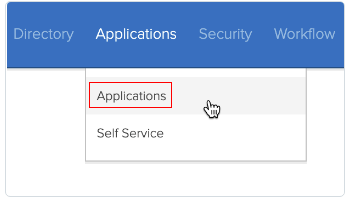
1. Log in to Okta as an administrator and click the **Admin** button to access the administration. Go to **Applications** from the menu bar and click **Applications**.
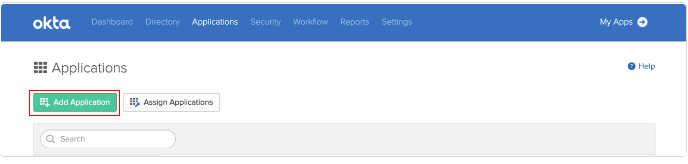
2\. Click **Add Application**.
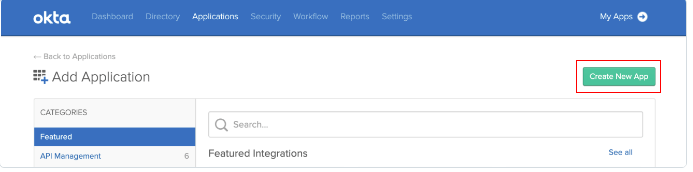
3\. Click **Create New App** on the top right.
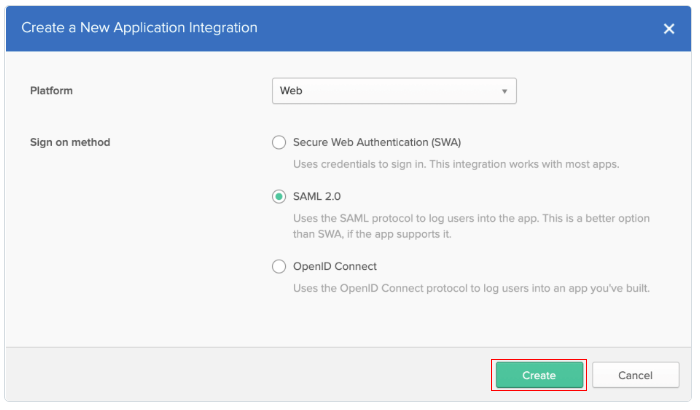
4\. Select Web as the **Platform** and SAML 2.0 as the **sign on method**. Click **Create**.
5\. Enter HackerEarth as the name of the new app.
Optional: Grab our [logos](https://www.hackerearth.com/logo/) and choose the one you would like to see in Okta for HackerEarth. Choose **Browse and Upload Logo** to upload your choice. Click **Next**.
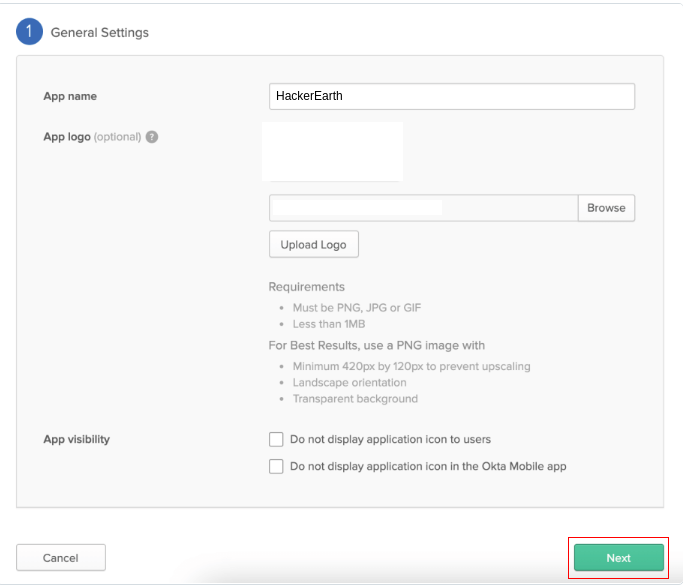
6\. Obtain the required Federation Metadata XML from Okta
- Click **Sign On** tab.
- Scroll down to the Optional configuration data and copy the IDP metadata to the clipboard.
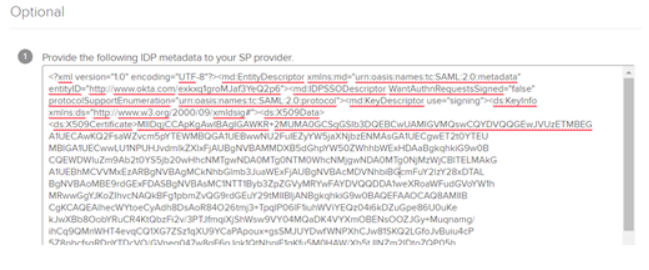
- Save this IDP (XML) metadata.
7\. Share the metadata with HackerEarth
8\. HackerEarth will configure your metadata at our end and share HackerEarth’s metadata
9\. Once you receive the metadata from HackerEarth, paste the *HTTP-POST AssertionConsumerService URL* into Single sign on URL and the *entityID URI* into Audience URI (SP Entity ID) respectively. Select **Use this for Recipient** **URL and Destination URL**.
10\. Select EmailAddress in Name ID format, and Email in Application username. Do not click Next yet!
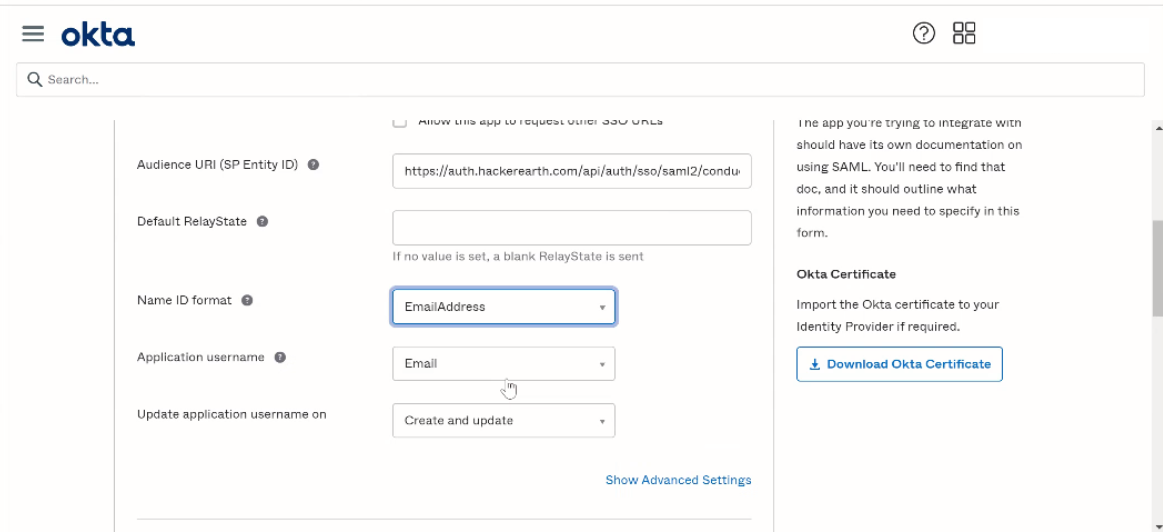
11\. Scroll down to the ATTRIBUTE STATEMENTS (OPTIONAL) section on this same page. Add the following three attributes here as shown below, then click **Next**.
| **Name** | **Name Format** | **Value** |
| --- | --- | --- |
| FirstName | URI Reference | user.firstName |
| LastName | URI Reference | user.lastName |
| EmailAddress | URI Reference | user.email |
12\. Click **Save**.
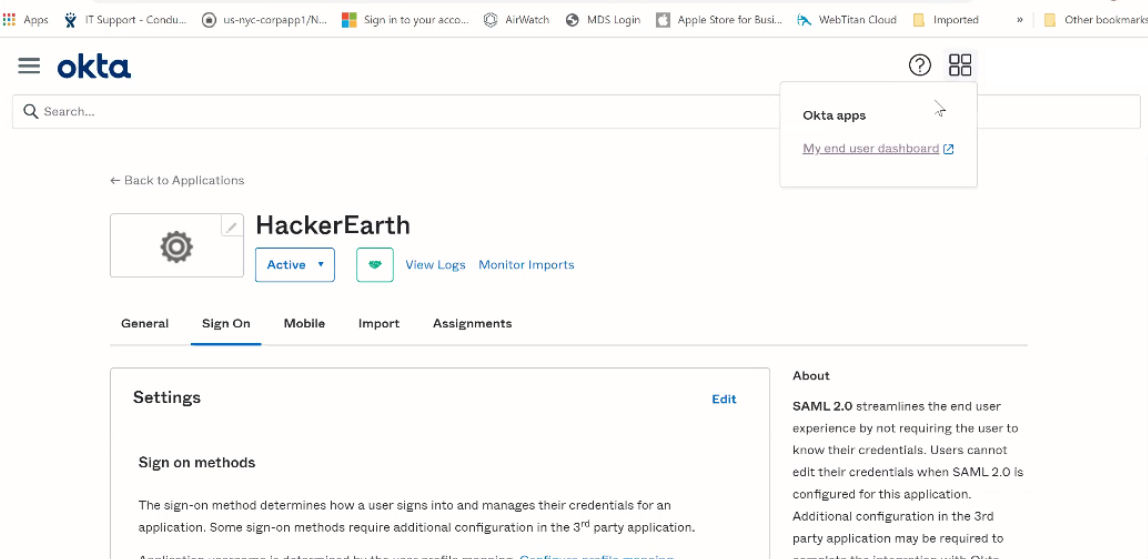
13\. Move to **My end user** dashboard and select HackerEarth app to test the SSO integration.
- [Assessments: Recruiters](https://help.hackerearth.com/assessments-recruiters#main-content)
- [Getting started](https://help.hackerearth.com/assessments-recruiters#getting-started)
- [Account settings](https://help.hackerearth.com/assessments-recruiters#account-settings)
- [Admin management](https://help.hackerearth.com/assessments-recruiters#admin-management)
- [Creating tests automatically](https://help.hackerearth.com/assessments-recruiters#creating-tests-automatically)
- [Creating tests manually](https://help.hackerearth.com/assessments-recruiters#creating-tests-manually)
- [Test settings](https://help.hackerearth.com/assessments-recruiters#test-settings)
- [Sections and question pooling](https://help.hackerearth.com/assessments-recruiters#sections-and-question-pooling)
- [Libraries](https://help.hackerearth.com/assessments-recruiters#libraries)
- [Multiple Choice Questions (MCQs)](https://help.hackerearth.com/assessments-recruiters#multiple-choice-questions-mcqs)
- [Programming](https://help.hackerearth.com/assessments-recruiters#programming)
- [Project](https://help.hackerearth.com/assessments-recruiters#project)
- [Front end](https://help.hackerearth.com/assessments-recruiters#front-end)
- [SQL](https://help.hackerearth.com/assessments-recruiters#sql)
- [Data science](https://help.hackerearth.com/assessments-recruiters#data-science)
- [Machine Learning (ML)](https://help.hackerearth.com/assessments-recruiters#machine-learning-ml)
- [DevOps](https://help.hackerearth.com/assessments-recruiters#devops)
- [Python project questions](https://help.hackerearth.com/assessments-recruiters#python-project-questions)
- [Automation Testing](https://help.hackerearth.com/assessments-recruiters#automation-testing)
- [Java Project](https://help.hackerearth.com/assessments-recruiters#java-project)
- [C# project questions](https://help.hackerearth.com/assessments-recruiters#c-project-questions)
- [Subjective](https://help.hackerearth.com/assessments-recruiters#subjective)
- [Approximate](https://help.hackerearth.com/assessments-recruiters#approximate)
- [Diagram](https://help.hackerearth.com/assessments-recruiters#diagram)
- [File upload](https://help.hackerearth.com/assessments-recruiters#file-upload)
- [Invites](https://help.hackerearth.com/assessments-recruiters#invites)
- [Reports](https://help.hackerearth.com/assessments-recruiters#reports)
- [Billing](https://help.hackerearth.com/assessments-recruiters#billing)
- [HackerEarth Reports: Admins, Tests, and Teams](https://help.hackerearth.com/assessments-recruiters#hackerearth-reports-admins-tests-and-teams)
- [Technical Content Updates](https://help.hackerearth.com/assessments-recruiters#technical-content-updates)
- [FaceCode](https://help.hackerearth.com/facecode#main-content)
- [FaceCode and its features](https://help.hackerearth.com/facecode#facecode-and-its-features)
- [Scheduling interviews on FaceCode](https://help.hackerearth.com/facecode#scheduling-interviews-on-facecode)
- [Assessments: ATS integrations](https://help.hackerearth.com/assessments-ats-integrations#main-content)
- [Integration](https://help.hackerearth.com/assessments-ats-integrations#integration)
- [iCIMS](https://help.hackerearth.com/assessments-ats-integrations#icims)
- [Zoho Recruit](https://help.hackerearth.com/assessments-ats-integrations#zoho-recruit)
- [SmartRecruiters](https://help.hackerearth.com/assessments-ats-integrations#smartrecruiters)
- [EightFold](https://help.hackerearth.com/assessments-ats-integrations#eightfold)
- [SuccessFactors](https://help.hackerearth.com/assessments-ats-integrations#successfactors)
- [Greenhouse](https://help.hackerearth.com/assessments-ats-integrations#greenhouse)
- [Lever](https://help.hackerearth.com/assessments-ats-integrations#lever)
- [Linkedin Talent Hub](https://help.hackerearth.com/assessments-ats-integrations#linkedin-talent-hub)
- [JazzHR](https://help.hackerearth.com/assessments-ats-integrations#jazzhr)
- [Workable](https://help.hackerearth.com/assessments-ats-integrations#workable)
- [Recruiterbox - Trakstar Hire](https://help.hackerearth.com/assessments-ats-integrations#recruiterbox-trakstar-hire)
- [Jobvite](https://help.hackerearth.com/assessments-ats-integrations#jobvite)
- [Ashby](https://help.hackerearth.com/assessments-ats-integrations#ashby)
- [Assessments: Product updates](https://help.hackerearth.com/assessments-product-updates#main-content)
- [Release notes: HackerEarth Assessment](https://help.hackerearth.com/assessments-product-updates#release-notes-hackerearth-assessment)
- [Root Cause Analysis (RCA)](https://help.hackerearth.com/assessments-product-updates#root-cause-analysis-rca)
- [Content updates](https://help.hackerearth.com/assessments-product-updates#content-updates)
- [Assessments: Best practices](https://help.hackerearth.com/assessments-best-practices#main-content)
- [Recruit](https://help.hackerearth.com/assessments-best-practices#recruit)
- [SSO](https://help.hackerearth.com/sso#main-content)
- [SSO](https://help.hackerearth.com/sso#sso)
- [Upskilling](https://help.hackerearth.com/upskilling#main-content)
- [Introduction: Upskilling](https://help.hackerearth.com/upskilling#introduction-upskilling)
- [Assessments: Candidates](https://help.hackerearth.com/assessments-candidates#main-content)
- [Getting started](https://help.hackerearth.com/assessments-candidates#getting-started)
- [Test environment](https://help.hackerearth.com/assessments-candidates#test-environment)
- [Question types](https://help.hackerearth.com/assessments-candidates#question-types)
- [FaceCode](https://help.hackerearth.com/assessments-candidates#facecode)
- [Feedback and queries](https://help.hackerearth.com/assessments-candidates#feedback-and-queries)
- [Problem setting for HackerEarth](https://help.hackerearth.com/problem-setting-for-hackerearth#main-content)
- [Rate cards](https://help.hackerearth.com/problem-setting-for-hackerearth#rate-cards)
- [Campus](https://help.hackerearth.com/campus#main-content)
- [Recruiters](https://help.hackerearth.com/campus#recruiters)
- [Recruiter FAQs](https://help.hackerearth.com/campus#recruiter-faqs)
- [Candidate FAQs](https://help.hackerearth.com/campus#candidate-faqs)
- [Hackathons and Hiring Challenges](https://help.hackerearth.com/hackathons-and-hiring-challenges#main-content)
- [Hackathons](https://help.hackerearth.com/hackathons-and-hiring-challenges#hackathons)
- [Hiring challenges](https://help.hackerearth.com/hackathons-and-hiring-challenges#hiring-challenges)
- [Frequently Asked Questions (FAQs)](https://help.hackerearth.com/frequently-asked-questions-faqs#main-content)
- [Assessments: Recruiters](https://help.hackerearth.com/frequently-asked-questions-faqs#assessments-recruiters)
- [GDPR compliance (Candidates)](https://help.hackerearth.com/frequently-asked-questions-faqs#gdpr-compliance-candidates)
- [GDPR compliance (Recruiters)](https://help.hackerearth.com/frequently-asked-questions-faqs#gdpr-compliance-recruiters)
- [General](https://help.hackerearth.com/frequently-asked-questions-faqs#general)
- [Assessments: Candidates](https://help.hackerearth.com/frequently-asked-questions-faqs#assessments-candidates)
- [HackerEarth Vs ChatGPT](https://help.hackerearth.com/frequently-asked-questions-faqs#hackerearth-vs-chatgpt)
- [Profiles](https://help.hackerearth.com/profiles#main-content)
- [Profiles - Recruiter](https://help.hackerearth.com/profiles#profiles-recruiter)
- [OnScreen](https://help.hackerearth.com/onscreen#main-content)
- [OnScreen - Interview templates](https://help.hackerearth.com/onscreen#onscreen-interview-templates)
- [OnScreen - Sending Invites](https://help.hackerearth.com/onscreen#onscreen-sending-invites)
- [OnScreen - Download reports](https://help.hackerearth.com/onscreen#onscreen-download-reports)
- [OnScreen - Interview Analytics](https://help.hackerearth.com/onscreen#onscreen-interview-analytics)
- [OnScreen - Overview](https://help.hackerearth.com/onscreen#onscreen-overview)
- [OnScreen - Interview Proctoring Settings](https://help.hackerearth.com/onscreen#onscreen-interview-proctoring-settings)
[](https://www.hackerearth.com/)
##### The skills intelligence platform for the AI era. Evaluate developers, candidates, and AI agents.
© 2026 HackerEarth · All rights reserved