---
title: Use the Monaco code editor in HackerEarth tests
description: Learn about the Monaco editor and its features, including IntelliSense, code linting, documentation hints, and keyboard shortcuts, for coding questions.
---
[Skip to content](https://help.hackerearth.com/the-monaco-editor#main-content)

Open main navigation
Close main navigation
Hello. How can we help you?
- There are no suggestions because the search field is empty.
1. [Help Center](https://help.hackerearth.com/)
2. [Assessments: Candidates](https://help.hackerearth.com/assessments-candidates)
3. [Test environment](https://help.hackerearth.com/assessments-candidates#test-environment)
# Use the Monaco code editor in HackerEarth tests
## About the Monaco editor
*Currently, the Monaco editor is only available for the following question types: Programming, Golf, Approximation, SQL, and Data science.*
HackerEarth is now embedded with a more reliable and efficient editor—the Monaco editor. This editor has various useful features that give candidates a better candidate experience.
This editor powers one of the most popular and effective editors—Visual Studio Code (VS Code).
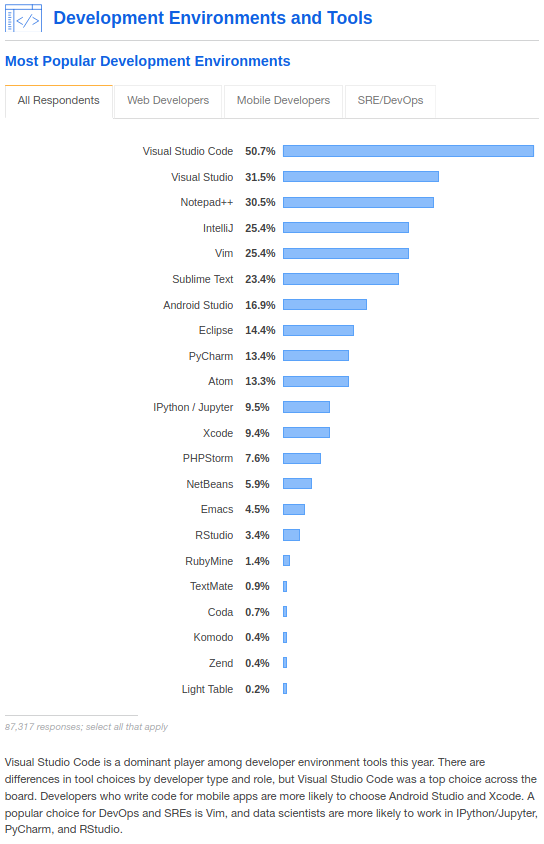
**Image source**: Stack Overflow 2019 Developer Survey
The VSCode editor includes embedded Git and provides support for debugging, syntax highlighting, intelligent code completion, snippets, and code refactoring. It is highly customizable and allows users to change the theme, keyboard shortcuts, preferences, and install extensions that add additional functionalities.
Features
The features of the Monaco editor are as follows:
IntelliSense
*Currently, this feature is enabled only for C, C++, C++14, C++17, Java, Java 8, JavaScript(Node.js), Python, Python 3, and Python 3.8, Bash, Swift, and Typescript.*
This term represents a variety of code features. These features include auto-completion of code, providing parameters and quick information, and displaying member lists.
**Note**: In this article, **members** represent classes, methods, variables, parameters, etc.
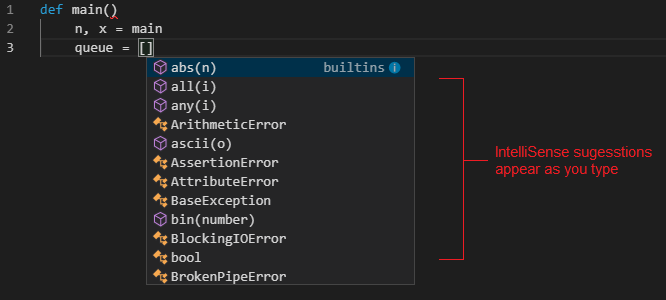
### IntelliSense hinting or auto-completion of code
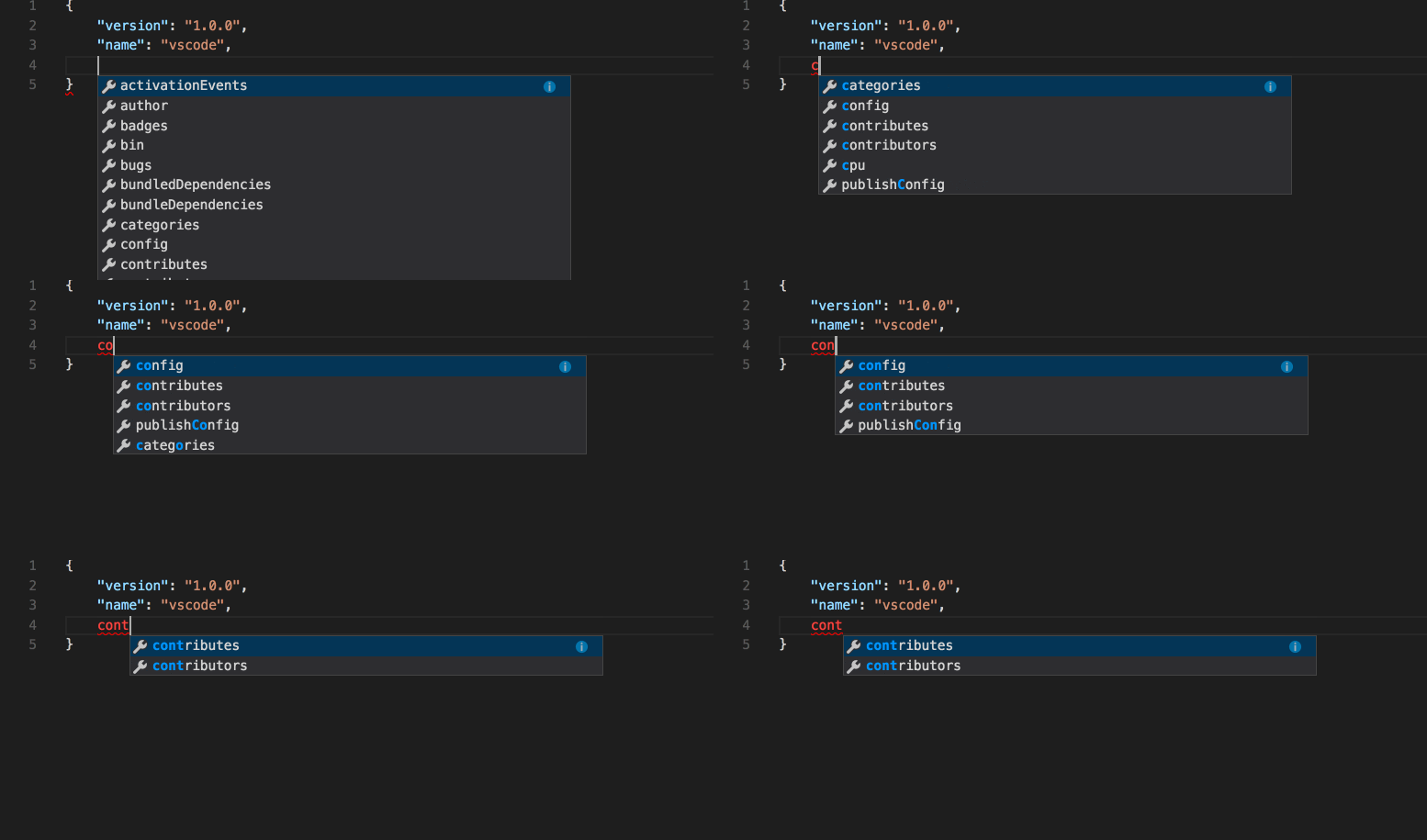
This feature can be enabled in the editor window by clicking **Ctrl+Space** or by entering a trigger character such as the dot character (**.**) in languages specifically Python, Java, and JavaScript or the scope-resolution operator (**::**) in languages specifically C++.
If you continue entering characters, then the list of members is displayed that only includes members containing the characters that you have entered.
To insert the selected member, press **Tab** or **Enter** from your keyboard.
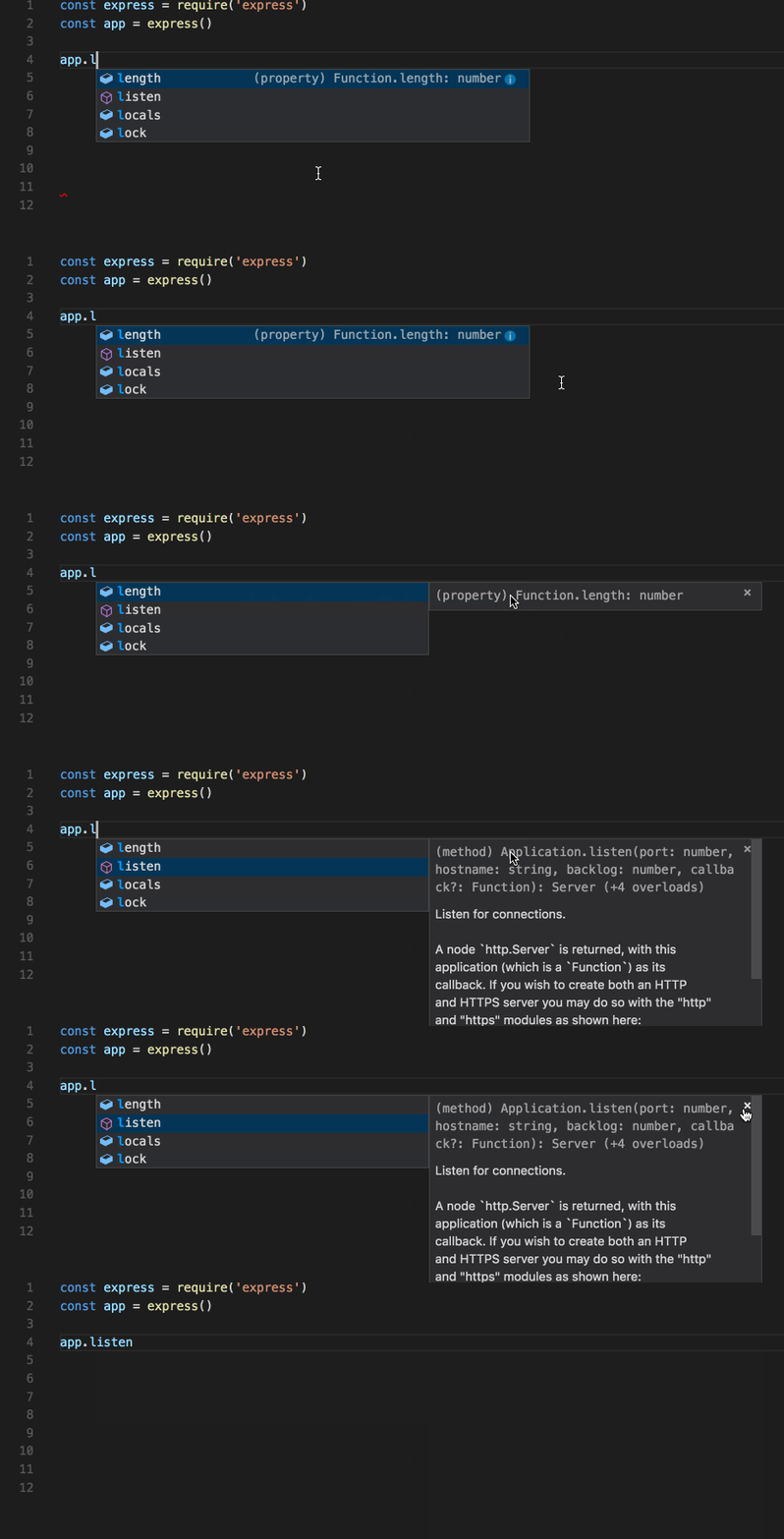
### Documentation and quick information
You can view quick information for each method by either pressing **Ctrl+Space** or clicking the info () icon. The accompanying explanation for the method or parameter expands to the side.
The explanation remains displayed and gets updated for all the members as you navigate the list. You can close by pressing **Ctrl+Space** again or by clicking the close () icon.
### Parameter information and function signature
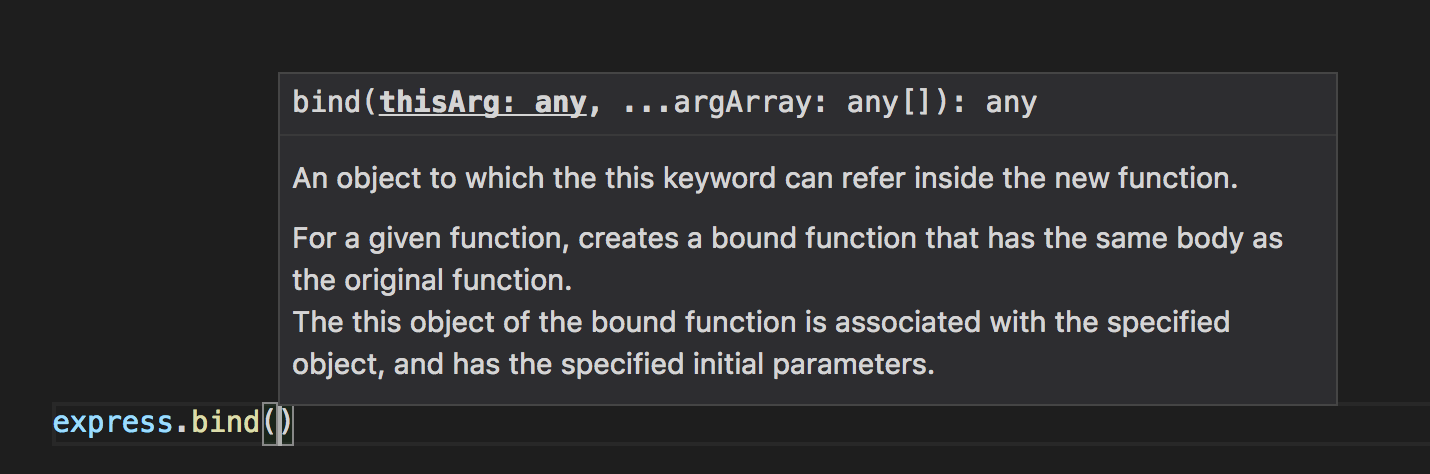
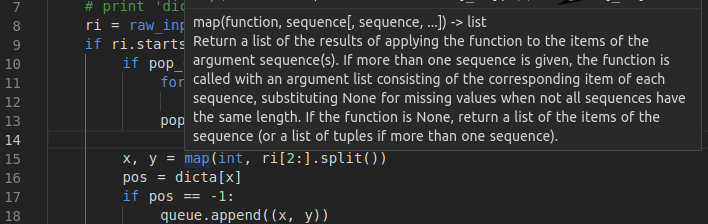
After selecting a method or member function, the parameter information is displayed. You can also hover over a function to view its documentation or explanation.
### Code linting
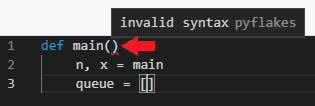
The real-time code linting feature highlights syntactical and stylistic problems in the source code. It helps candidates identify and correct precise programming errors or unconventional coding practices that can lead to errors.
For example, linting detects the use of an uninitialized or undefined variable, calls to undefined functions, missing parentheses, and issues such as attempting to redefine built-in types or functions.
### Configurable
You can turn on and off the IntelliSense feature from the editor settings by following these steps:
1. Click .
2. Click .
Accessibility
This Monaco editor is quite accessible. It has features that include:
- Adjustment of the font size
- High contrast colors that improve editor visibility
- Keyboard-only navigation that allows you to write your code without the help of a mouse, thus allowing you to optimize your code.
### Keyboard shortcuts
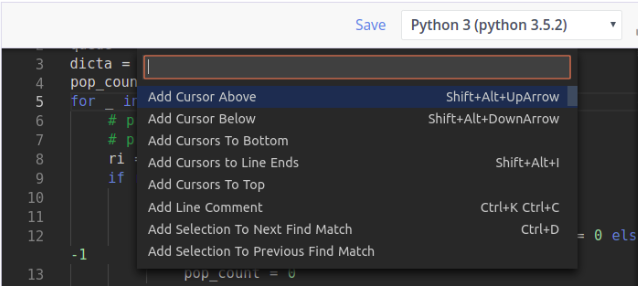
The Monaco editor provides an exhaustive list of commands or keyboard shortcuts in the Command Palette. To access the Command Palette, press **Ctrl+Shift+P**.
### Font sizes
You can change the font sizes by following these steps:
1. Click .
2. Select Small, Medium, or Large.

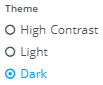
### Themes
You can change the themes of your editor screen by following these steps:
1. Click .
2. Select High Contrast, Light, and Dark.
Basic editing
This editor includes the features that you require for highly productive source code editing.
### Syntax highlighting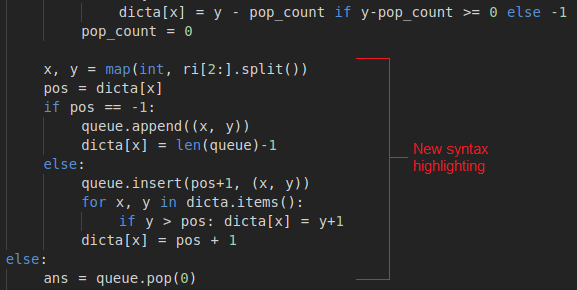
### Multiselection 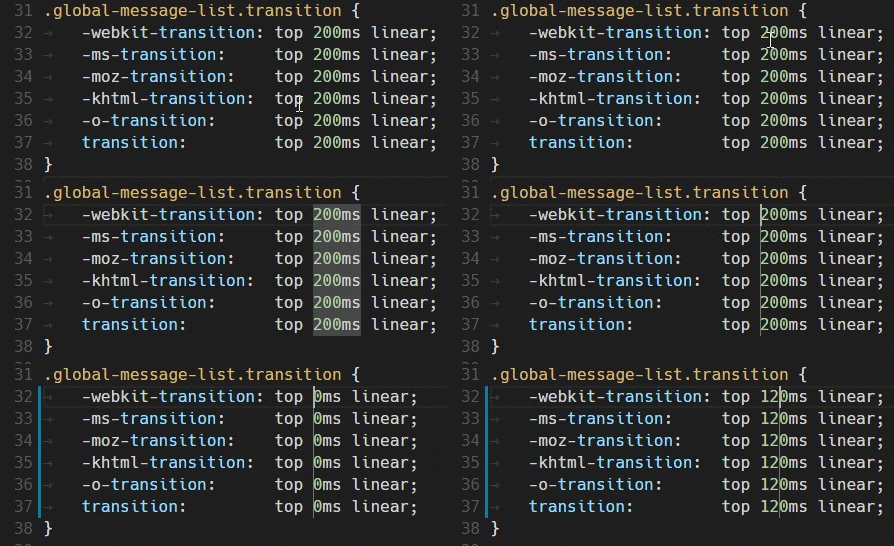 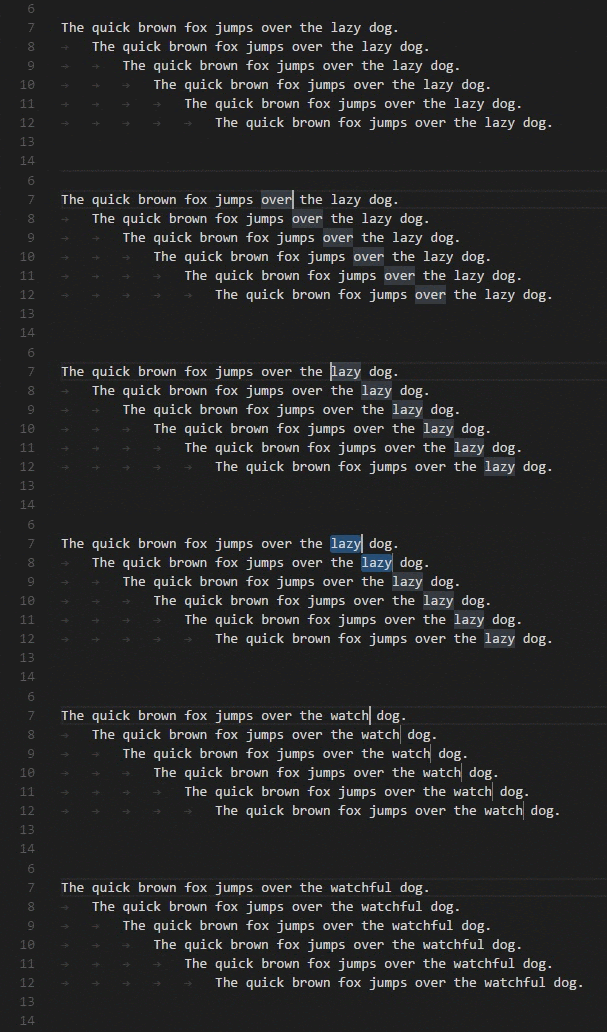
### Selection of multiple columns 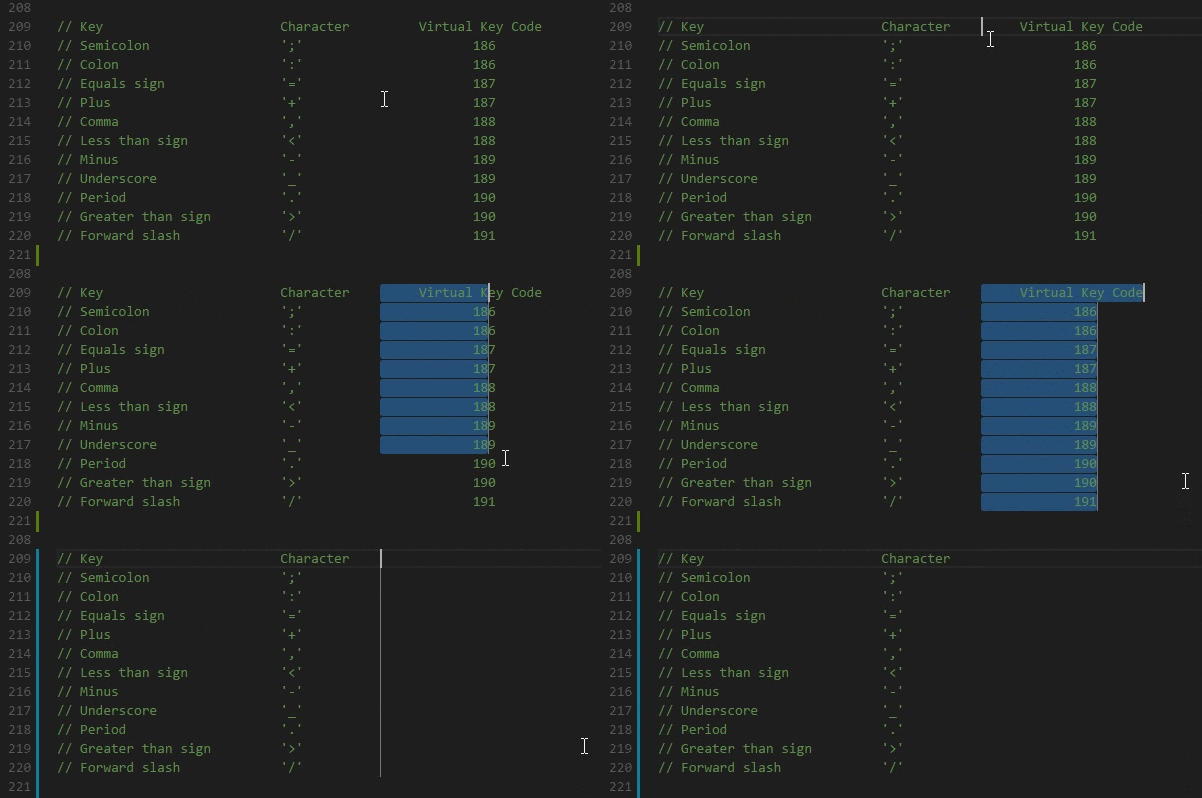
### Code autosave
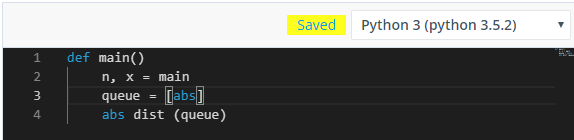
The code that you write gets autosaved to the system.
### Find and Replace
You can search for characters and replace them as required.
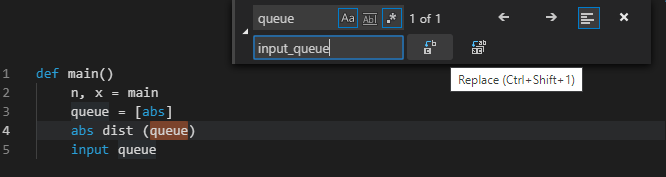
The components of this feature are as follows:
| **S. No.** | **Components** | **Description** |
| --- | --- | --- |
| 1 |  | Enter the characters that you want to find in your code. |
| 2 |  | Click to find the characters that have the same letter case as the characters that you have entered in the **Find** section. The keyboard shortcut to enable this option is **Alt+C**. For example, if you are entering '**Queue**' and you have enabled this option, then it does not find '**queue**' and displays '**No Results**'. 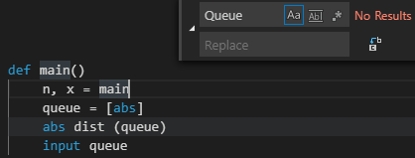 |
| 3 |  | Click here to match the whole world that you have entered in the **Find** section. The keyboard shortcut to enable this option is **Alt+W**. |
| 4 |  | Click here to use the regular expressions while searching for the characters that you have entered in the **Find** section. For example, if you enter '**que.u\***' and have enabled this option, then it finds '**queue**' in your code. 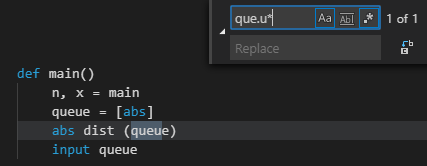 |
| 5 |  | Click here to search for the previous match. The keyboard shortcut to perform this task is **Shift+F3**. |
| 6 |  | Click here to search for the next match. The keyboard shortcut to perform this task is **F3**. |
| 7 |  | Click here to find the matched characters or words in a sequential manner. The keyboard shortcut to enable this option is **Alt+L**. |
| 8 |  | Click here to press the **Esc** button on your keyboard to close this module. |
| 9 |  | Enter the characters or words that you want to replace the searched characters with. |
| 10 |  | Click here to replace one instance of the matched characters or words. The keyboard |
| 11 |  | Click here to replace all the occurrences of the matched words in your code. |
### Indentation
You can select the number of spaces that are entered when you press **Tab** from your keyboard.

### Context menu
You can view different options when you right-click on the mouse after selecting your code.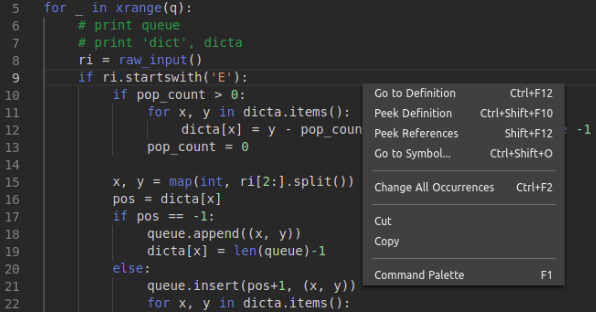
### Favorite language
You can also set a favorite language in which you can code. If you are comfortable to write your code in Python 3, then follow these steps to set it as your favorite language:
1. Click .
2. Click **Set Python 3 as favorite**.
### Default code template
You can set a default code template for all the coding-related questions in your test. To set a default code template, follow these steps:
1. Click .
2. Click **Set as default template**.
Earlier, all settings-related data were stored in your browser. Now, your preferences are saved to or retrieved from HackerEarth's databases.
This allows us to retrieve the editor state in a reliable way even in scenarios such as:
- Page reloads
- System crashes
- Multiple candidates are attempting tests on the same system
- You change your system while attempting the test
- [Assessments: Recruiters](https://help.hackerearth.com/assessments-recruiters#main-content)
- [Getting started](https://help.hackerearth.com/assessments-recruiters#getting-started)
- [Account settings](https://help.hackerearth.com/assessments-recruiters#account-settings)
- [Admin management](https://help.hackerearth.com/assessments-recruiters#admin-management)
- [Creating tests automatically](https://help.hackerearth.com/assessments-recruiters#creating-tests-automatically)
- [Creating tests manually](https://help.hackerearth.com/assessments-recruiters#creating-tests-manually)
- [Test settings](https://help.hackerearth.com/assessments-recruiters#test-settings)
- [Sections and question pooling](https://help.hackerearth.com/assessments-recruiters#sections-and-question-pooling)
- [Libraries](https://help.hackerearth.com/assessments-recruiters#libraries)
- [Multiple Choice Questions (MCQs)](https://help.hackerearth.com/assessments-recruiters#multiple-choice-questions-mcqs)
- [Programming](https://help.hackerearth.com/assessments-recruiters#programming)
- [Project](https://help.hackerearth.com/assessments-recruiters#project)
- [Front end](https://help.hackerearth.com/assessments-recruiters#front-end)
- [SQL](https://help.hackerearth.com/assessments-recruiters#sql)
- [Data science](https://help.hackerearth.com/assessments-recruiters#data-science)
- [Machine Learning (ML)](https://help.hackerearth.com/assessments-recruiters#machine-learning-ml)
- [DevOps](https://help.hackerearth.com/assessments-recruiters#devops)
- [Python project questions](https://help.hackerearth.com/assessments-recruiters#python-project-questions)
- [Automation Testing](https://help.hackerearth.com/assessments-recruiters#automation-testing)
- [Java Project](https://help.hackerearth.com/assessments-recruiters#java-project)
- [C# project questions](https://help.hackerearth.com/assessments-recruiters#c-project-questions)
- [Subjective](https://help.hackerearth.com/assessments-recruiters#subjective)
- [Approximate](https://help.hackerearth.com/assessments-recruiters#approximate)
- [Diagram](https://help.hackerearth.com/assessments-recruiters#diagram)
- [File upload](https://help.hackerearth.com/assessments-recruiters#file-upload)
- [Invites](https://help.hackerearth.com/assessments-recruiters#invites)
- [Reports](https://help.hackerearth.com/assessments-recruiters#reports)
- [Billing](https://help.hackerearth.com/assessments-recruiters#billing)
- [HackerEarth Reports: Admins, Tests, and Teams](https://help.hackerearth.com/assessments-recruiters#hackerearth-reports-admins-tests-and-teams)
- [Technical Content Updates](https://help.hackerearth.com/assessments-recruiters#technical-content-updates)
- [FaceCode](https://help.hackerearth.com/facecode#main-content)
- [FaceCode and its features](https://help.hackerearth.com/facecode#facecode-and-its-features)
- [Scheduling interviews on FaceCode](https://help.hackerearth.com/facecode#scheduling-interviews-on-facecode)
- [Assessments: ATS integrations](https://help.hackerearth.com/assessments-ats-integrations#main-content)
- [Integration](https://help.hackerearth.com/assessments-ats-integrations#integration)
- [iCIMS](https://help.hackerearth.com/assessments-ats-integrations#icims)
- [Zoho Recruit](https://help.hackerearth.com/assessments-ats-integrations#zoho-recruit)
- [SmartRecruiters](https://help.hackerearth.com/assessments-ats-integrations#smartrecruiters)
- [EightFold](https://help.hackerearth.com/assessments-ats-integrations#eightfold)
- [SuccessFactors](https://help.hackerearth.com/assessments-ats-integrations#successfactors)
- [Greenhouse](https://help.hackerearth.com/assessments-ats-integrations#greenhouse)
- [Lever](https://help.hackerearth.com/assessments-ats-integrations#lever)
- [Linkedin Talent Hub](https://help.hackerearth.com/assessments-ats-integrations#linkedin-talent-hub)
- [JazzHR](https://help.hackerearth.com/assessments-ats-integrations#jazzhr)
- [Workable](https://help.hackerearth.com/assessments-ats-integrations#workable)
- [Recruiterbox - Trakstar Hire](https://help.hackerearth.com/assessments-ats-integrations#recruiterbox-trakstar-hire)
- [Jobvite](https://help.hackerearth.com/assessments-ats-integrations#jobvite)
- [Ashby](https://help.hackerearth.com/assessments-ats-integrations#ashby)
- [Assessments: Product updates](https://help.hackerearth.com/assessments-product-updates#main-content)
- [Release notes: HackerEarth Assessment](https://help.hackerearth.com/assessments-product-updates#release-notes-hackerearth-assessment)
- [Root Cause Analysis (RCA)](https://help.hackerearth.com/assessments-product-updates#root-cause-analysis-rca)
- [Content updates](https://help.hackerearth.com/assessments-product-updates#content-updates)
- [Assessments: Best practices](https://help.hackerearth.com/assessments-best-practices#main-content)
- [Recruit](https://help.hackerearth.com/assessments-best-practices#recruit)
- [SSO](https://help.hackerearth.com/sso#main-content)
- [SSO](https://help.hackerearth.com/sso#sso)
- [Upskilling](https://help.hackerearth.com/upskilling#main-content)
- [Introduction: Upskilling](https://help.hackerearth.com/upskilling#introduction-upskilling)
- [Assessments: Candidates](https://help.hackerearth.com/assessments-candidates#main-content)
- [Getting started](https://help.hackerearth.com/assessments-candidates#getting-started)
- [Test environment](https://help.hackerearth.com/assessments-candidates#test-environment)
- [Question types](https://help.hackerearth.com/assessments-candidates#question-types)
- [FaceCode](https://help.hackerearth.com/assessments-candidates#facecode)
- [Feedback and queries](https://help.hackerearth.com/assessments-candidates#feedback-and-queries)
- [Problem setting for HackerEarth](https://help.hackerearth.com/problem-setting-for-hackerearth#main-content)
- [Rate cards](https://help.hackerearth.com/problem-setting-for-hackerearth#rate-cards)
- [Campus](https://help.hackerearth.com/campus#main-content)
- [Recruiters](https://help.hackerearth.com/campus#recruiters)
- [Recruiter FAQs](https://help.hackerearth.com/campus#recruiter-faqs)
- [Candidate FAQs](https://help.hackerearth.com/campus#candidate-faqs)
- [Hackathons and Hiring Challenges](https://help.hackerearth.com/hackathons-and-hiring-challenges#main-content)
- [Hackathons](https://help.hackerearth.com/hackathons-and-hiring-challenges#hackathons)
- [Hiring challenges](https://help.hackerearth.com/hackathons-and-hiring-challenges#hiring-challenges)
- [Frequently Asked Questions (FAQs)](https://help.hackerearth.com/frequently-asked-questions-faqs#main-content)
- [Assessments: Recruiters](https://help.hackerearth.com/frequently-asked-questions-faqs#assessments-recruiters)
- [GDPR compliance (Candidates)](https://help.hackerearth.com/frequently-asked-questions-faqs#gdpr-compliance-candidates)
- [GDPR compliance (Recruiters)](https://help.hackerearth.com/frequently-asked-questions-faqs#gdpr-compliance-recruiters)
- [General](https://help.hackerearth.com/frequently-asked-questions-faqs#general)
- [Assessments: Candidates](https://help.hackerearth.com/frequently-asked-questions-faqs#assessments-candidates)
- [HackerEarth Vs ChatGPT](https://help.hackerearth.com/frequently-asked-questions-faqs#hackerearth-vs-chatgpt)
- [Profiles](https://help.hackerearth.com/profiles#main-content)
- [Profiles - Recruiter](https://help.hackerearth.com/profiles#profiles-recruiter)
- [OnScreen](https://help.hackerearth.com/onscreen#main-content)
- [OnScreen - Interview templates](https://help.hackerearth.com/onscreen#onscreen-interview-templates)
- [OnScreen - Sending Invites](https://help.hackerearth.com/onscreen#onscreen-sending-invites)
- [OnScreen - Download reports](https://help.hackerearth.com/onscreen#onscreen-download-reports)
- [OnScreen - Interview Analytics](https://help.hackerearth.com/onscreen#onscreen-interview-analytics)
- [OnScreen - Overview](https://help.hackerearth.com/onscreen#onscreen-overview)
- [OnScreen - Interview Proctoring Settings](https://help.hackerearth.com/onscreen#onscreen-interview-proctoring-settings)
[](https://www.hackerearth.com/)
##### The skills intelligence platform for the AI era. Evaluate developers, candidates, and AI agents.
© 2026 HackerEarth · All rights reserved