
These settings control the reports that test admins receive after a candidate completes the assessment. To configure them, go to the Settings tab of your assessment and click Email and reports.
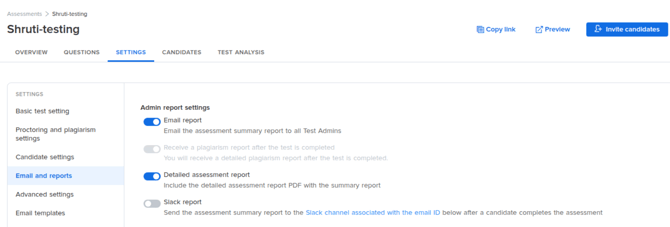
Email report
Sends the assessment summary report to all test admins by email after a candidate completes the assessment. This setting is enabled by default, so every test admin on the assessment receives the report without any additional setup. If an admin turns this toggle off, the summary report is no longer emailed.
Use this to keep your hiring team informed of candidate performance as results come in, instead of requiring each admin to check the dashboard.
Receive a plagiarism report after the test is completed
Sends a detailed plagiarism report to test admins after the test is completed, separate from the summary report. The report covers both types of plagiarism checks:
- Plagiarism within test: Compares candidate answers against each other to identify potential similarities.
- Plagiarism from Internet: Checks candidate answers against online databases and resources.
Use this when you want a full breakdown of plagiarism findings for each candidate — for example, for roles where you expect to scrutinize code originality closely — rather than relying on the plagiarism status shown in the candidate report.
Detailed assessment report
Includes the detailed assessment report as a PDF attachment along with the summary report. The summary gives you the headline result, while the detailed report contains the candidate's full performance breakdown. Use this when admins need to review a candidate's answers and scores directly from their inbox, or when you want a report to forward to a hiring manager who does not have dashboard access.
Slack report
Sends the assessment summary report to the Slack channel that is associated with the email ID configured below this setting, after a candidate completes the assessment. Use this when your hiring team tracks candidates in Slack and you want results to arrive in the channel rather than in individual inboxes. Email and Slack delivery are independent, so you can use either or both.