![HE logo.png]](https://help.hackerearth.com/hs-fs/hubfs/HE%20logo.png?height=40&name=HE%20logo.png)
To enable the integration, follow these steps:
- Log into your HackerEarth Recruit account using admin credentials.
- From the left sidebar, click your name in the bottom-left corner, then select Settings.
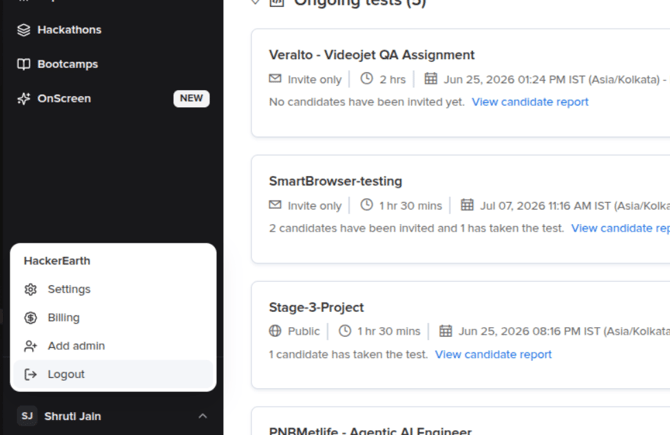
- Under Company, click Integrations.
- Click + Connect an ATS.
- Select Greenhouse from the list.
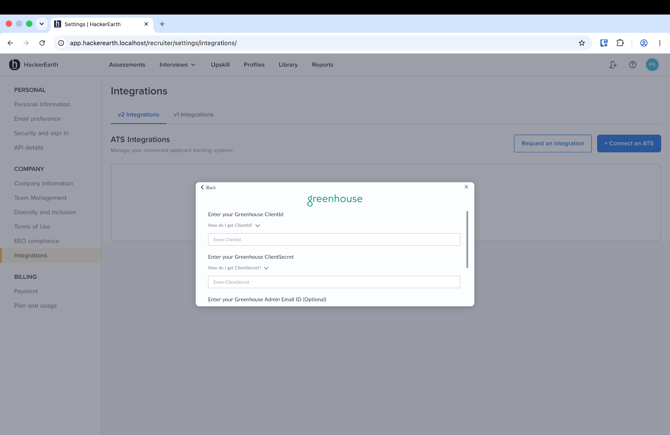
- Enter the Client key from Step 1 as the ClientId.
- Enter the Client secret from Step 1 as the ClientSecret.
- Optionally, enter a Greenhouse Admin Email ID.
- Click Submit to complete the connection.
Generating the HackerEarth assessment secret
The assessment secret is generated from HackerEarth and must be configured in the HackerEarth app in Greenhouse.
- In HackerEarth, open Settings.
- Go to ATS Integrations.
- Open the connected Greenhouse integration.
- Generate the assessment secret.
- Copy the generated secret.
Note: The assessment secret is generated once for a company. Keep it secure. The Greenhouse integration works only when the valid HackerEarth assessment secret is configured in Greenhouse.
Registering the assessment secret with Greenhouse
Greenhouse must register the secret on their side before the Assessment stage will work. To do this:
- Once you've copied the assessment secret, have your Greenhouse account admin email partner-support@greenhouse.io to request the assessment API integration be enabled.
- Do not include the assessment secret in this email. Greenhouse Support will reply with a secure SendSafely link.
- Enter the assessment secret into the SendSafely link when it arrives.
- Wait for a confirmation email from Greenhouse Support confirming the secret has been registered.
For Greenhouse's own steps on this process, see their article: Set up an assessment API integration.
You have successfully generated and registered the HackerEarth assessment secret.