![HE logo.png]](https://help.hackerearth.com/hs-fs/hubfs/HE%20logo.png?height=40&name=HE%20logo.png)
You can export the data of all the candidates who were invited to interviews that are based on a template. Use this when you want to review candidate results outside the platform or share them with your hiring team.
To download candidate data, follow these steps:
- Log in to your HackerEarth Recruit account by using your admin credentials.
- In the left panel, click OnScreen.
- Open the template for which you want to download the data.
- Click the Candidates tab.
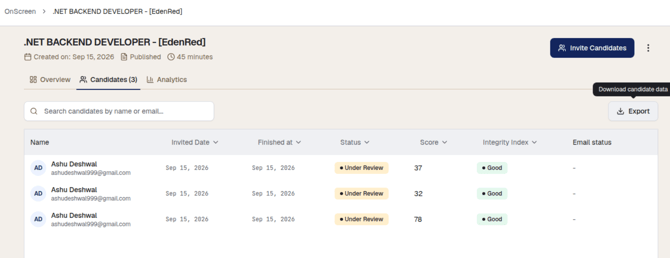
- Click Export. The Download candidate data dialog box is displayed.
- Select the date range for which you want to export the data:
- All time
- Last 7 days
- Last 30 days
- Custom: Select your own start and end dates
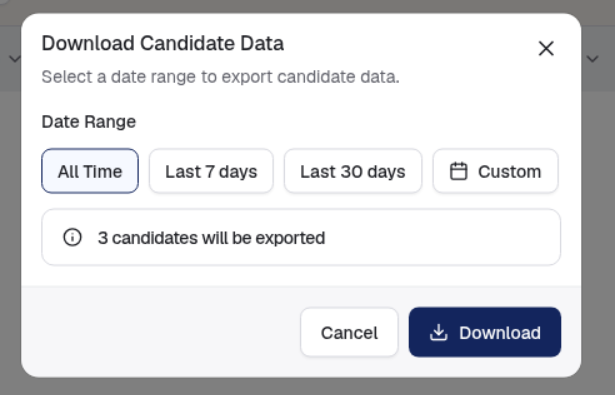
- Click Download.
To close the dialog box without exporting, click Cancel.
Note: The Candidates tab also lets you search for a candidate by name or email address, and sort the list by Invited date, Finished at, Status, Score, or Integrity index.
Downloading an individual candidate's AI interview report
You can download the AI interview report of a single candidate as a PDF, along with the interview transcription and the candidate's responses.
To download a candidate's report, follow these steps:
- Log in to your HackerEarth Recruit account by using your admin credentials.
- In the left panel, click OnScreen.
- Open the template that the candidate was invited to.
- Click the Candidates tab.
- Click the candidate whose report you want to download. The candidate's interview report opens, showing the overall score, the score for each skill, the integrity index, the AI-likeness result, and the proctoring and integrity details.
- In the top-right corner, click the three dots.
- Click Download report. The report is downloaded as a PDF.
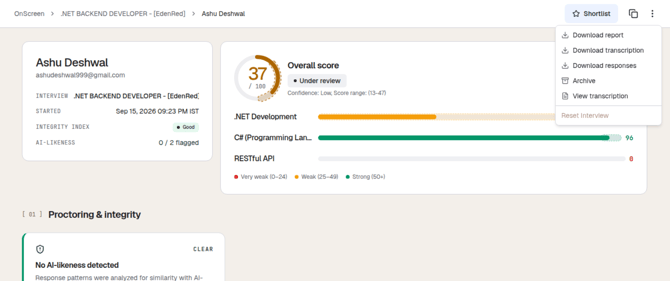
The same menu contains the following options:
- Download transcription: Downloads the transcription of the interview.
- Download responses: Downloads the candidate's responses.
- View transcription: Opens the transcription in the platform, without downloading it.
- Archive: Archives the candidate.
- Reset interview: Resets the interview for the candidate.