![HE logo.png]](https://help.hackerearth.com/hs-fs/hubfs/HE%20logo.png?height=40&name=HE%20logo.png)
FaceCode interviews are scheduled using Greenhouse's standard interview scheduler — there's no separate HackerEarth-specific scheduling screen.
- Log in to Greenhouse.
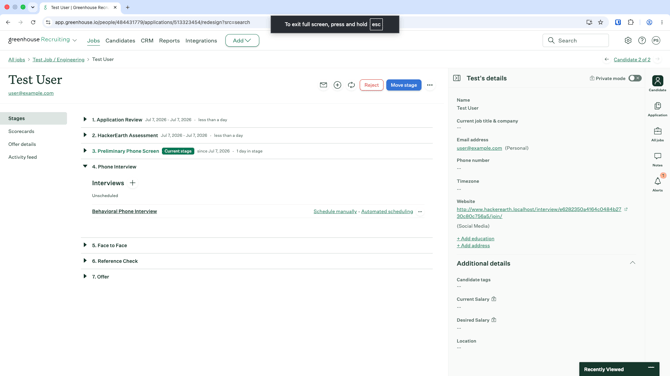
- Open the candidate's profile.
- Under Interviews, find the relevant interview listed as Unscheduled, and click Schedule manually (or Automated scheduling to send the candidate a self-scheduling link instead).
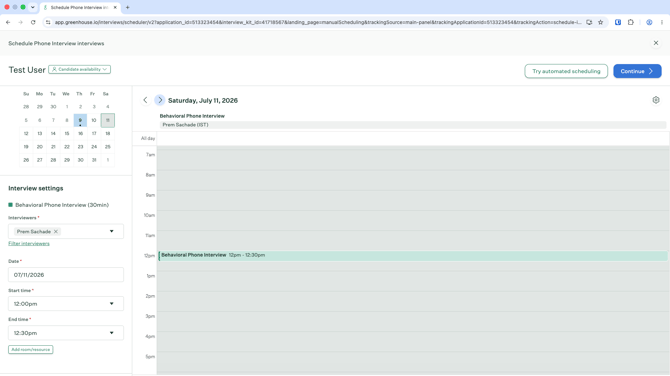
- In the scheduler that opens:
- Add one or more Interviewers.
- Set the Date, Start time, and End time. Use the mini calendar and day view to check availability and place the interview on the schedule.
- Optionally, click Add room/resource.
- Click Continue.
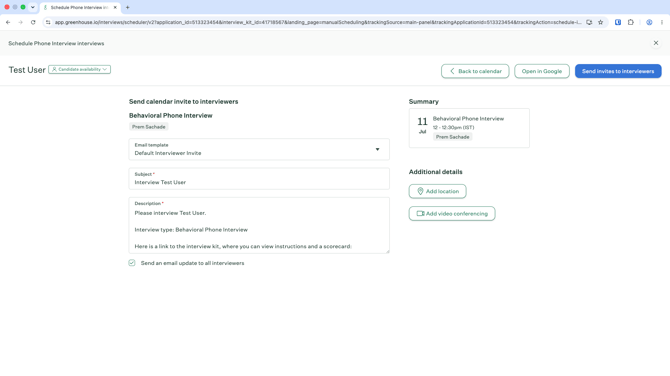
- On the next screen, Send calendar invite to interviewers:
- Review the Email template, Subject, and Description (auto-filled, and includes a link to the interview kit).
- Optionally, click Add location or Add video conferencing.
- Leave Send an email update to all interviewers checked (default) unless you want to skip notifying them.
- Click Send invites to interviewers.
Sending the invite is what triggers HackerEarth to create the FaceCode interview using the same date, time, timezone, and interviewer details.